Load Testing and Simulated Client Requests
Introduction
This module plays the "player" role in the architecture diagram, and is used to simulate players.
It is designed for simulated clients and greatly reduces simulation workload. You only need to write requests and callbacks. After using this module, when collaborating with frontend developers, you no longer need repetitive manual retests like "click again, click again".
Besides simulating simple requests, it can orchestrate complex request flows and support load testing for complex business scenarios. The simulation process is interactive and also supports test automation. Unlike unit tests, this module simulates a real network environment, and server interaction during simulation is continuous and interactive.
Interactive mode is used for debugging specific features. During interaction, developers can trigger specific simulation commands in the console, and also input dynamic request parameters in the console, making it easy to test different business branches.
Simulated client features
- Easy to use
- Supports load testing
- Can simulate client requests
- Can simulate real network environments
- Can orchestrate complex business requests
- The same simulation test case works with multiple connection types (
tcp,udp,websocket) - Continuous server interaction; simulation is interactive and also supports test automation
How to Install
The simulated client is a standalone optional module. Add it to pom.xml when needed.
see https://central.sonatype.com/artifact/com.iohao.net/extension-client
<dependency>
    <groupId>com.iohao.net</groupId>
    <artifactId>extension-client</artifactId>
    <version>${ionet.version}</version>
</dependency>
Getting Started Demo
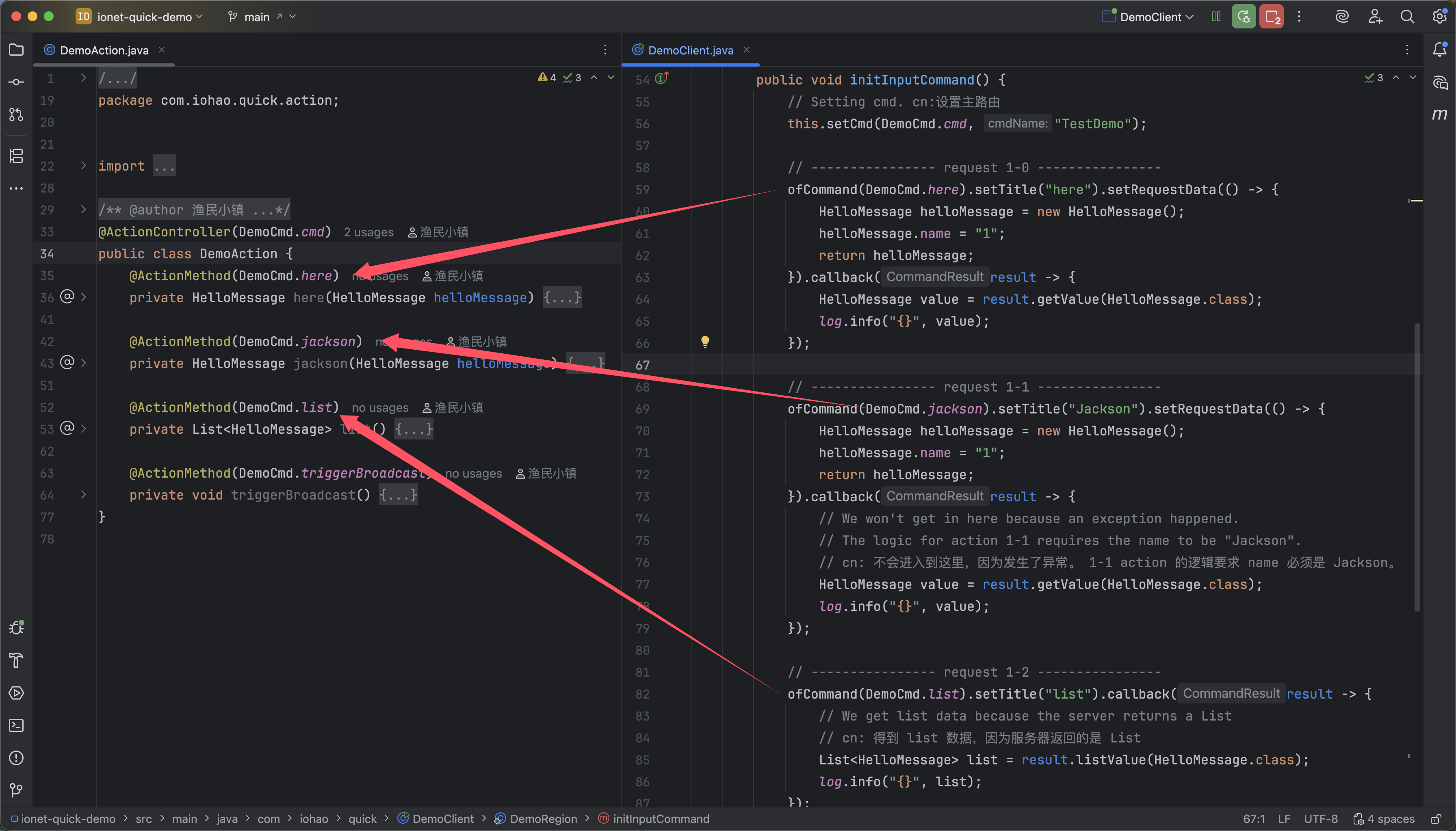
action and simulated client
DemoAction: an action exposed by the server.DemoClient: client simulation request code.
The simulation requests in the diagram correspond to those actions.
After starting the simulated client
As shown below, the console becomes interactive. You can view simulation command lists and input commands in the console to trigger specific requests.
cmd-subCmd

Input request commands in console
After inputting a command, the corresponding simulated request is triggered. When the server responds, the corresponding callback is invoked.

Summary
Overall usage is straightforward: developers only need to write request and callback logic. Then input the command number in the console to trigger requests. The beginner-level demo ends here; the following content is advanced. If you are completely new to the framework, it is not recommended to continue below yet.
This demo uses code from the full Quickly build a server from zero example. For a quick hands-on experience, download and run the source code.
Concept Introduction
A simulated client consists of multiple custom InputCommandRegion instances.
Usually, one InputCommandRegion corresponds to one action class.
InputCommandRegion
InputCommandRegion is used to configure simulated client requests and broadcast listeners.
For customization, inherit AbstractInputCommandRegion.
Adding Broadcast and Request Commands
Code description
- code 4: when the simulated client starts,
initInputCommandis triggered. Developers can write simulation request logic in this method. - code 6: set main route and title, corresponding to the main route used by the action class.
- code 9~16: add one simulated request command.
- ofCommand: set sub-route used to access a specific action.
- setTitle: set a title for easy viewing in console.
- setRequestData: this object is received by the action as request parameters.
- callback: receives action return value.
- code 21~24: add a broadcast listener to receive broadcast data from server.
- ofListen: set sub-route and listen broadcast route, and set a title for easy viewing in console.
- code 22: when broadcast data is received, use
resultto access data.
public class DemoRegion extends AbstractInputCommandRegion {
    ...
    @Override
    public void initInputCommand() {
        // Setting cmd. cn:设置主路由
        this.setCmd(DemoCmd.cmd, "TestDemo");

        // ---------------- request 1-0 ----------------
        ofCommand(DemoCmd.here).setTitle("here").setRequestData(() -> {
            HelloMessage helloMessage = new HelloMessage();
            helloMessage.name = "1";
            return helloMessage;
        }).callback(result -> {
            HelloMessage value = result.getValue(HelloMessage.class);
            log.info("{}", value);
        });

        ...

        // ---------------- Broadcast Listener. cn: 广播监听 ----------------
        ofListen(result -> {
            List<HelloMessage> helloMessageList = result.listValue(HelloMessage.class);
            log.info("{}", helloMessageList);
        }, DemoCmd.listenList, "listenList");
    }
}


public interface DemoCmd {
    int cmd = 1;

    int here = 0;
    int jackson = 1;
    int list = 2;

    int triggerBroadcast = 3;

    AtomicInteger broadcastIndex = new AtomicInteger(20);
    CmdInfo listenData = CmdInfo.of(cmd, broadcastIndex.getAndIncrement());
    CmdInfo listenList = CmdInfo.of(cmd, broadcastIndex.getAndIncrement());
}
How to View Broadcast and Request Commands
- Input
.in console to view all request commands. - Input
..in console to view all broadcast commands. - Input
...in console to view all request and broadcast commands.

How to Execute Request Commands
Via code
ofRequestCommand(DemoCmd.here).execute();
// or
executeCommand(DemoCmd.here);
Via console
In console, input route 1-0.
ClientRunOne Start Client
ClientRunOne is the client startup class.
- code 10: add custom
InputCommandRegion. - code 11: start the simulated client.
public class DemoClient {
    static void main() {
        // US or CHINA
        Locale.setDefault(Locale.US);

        // closeLog. cn: 关闭模拟请求相关日志
        ClientUserConfigs.closeLog();
        // Startup Client. cn: 启动模拟客户端
        new ClientRunOne()
                .setInputCommandRegions(List.of(new DemoRegion()))
                .startup();
    }

    static class DemoRegion extends AbstractInputCommandRegion {
        @Override
        public void initInputCommand() {
            ...
        }
    }
}
More Configurations
- code 4: i18n settings.
- code 5: disable console input.
- code 6: disable simulation request logs.
- code 8~13: load
InputCommandRegionon demand. As mentioned earlier, one action class maps to oneInputCommandRegion. As systems evolve, actions may grow to hundreds or thousands. This management style lets you load test data by module and avoid too much interference. - code 17: enable heartbeat, send every 10 seconds.
- code 18: set connection type.
- code 19: set connection IP.
- code 20: set connection port.
public class DemoClient {
    static void start(long userId) {
        // US or CHINA
        Locale.setDefault(Locale.US);
        ClientUserConfigs.closeScanner = true;
        ClientUserConfigs.closeLog();

        List<InputCommandRegion> inputCommandRegions = List.of(
            new HallRegion()
            // , new RoomRegion()
            // , new Jsr380Region()
            // , new BroadcastRegion()
        );

        new ClientRunOne()
            .setInputCommandRegions(inputCommandRegions)
            .idle(10)
            .setJoinEnum(ExternalJoinEnum.TCP)
            .setConnectAddress("127.0.0.1")
            .setConnectPort(ExternalGlobalConfig.externalPort)
            .startup();
    }
}
ScannerKit Console Input Helper
ScannerKit is a console input helper class used to prompt and receive console input.
It is especially useful in test scenarios requiring dynamic input.
- code 2: prompt tester input in the console.
- code 3: receive console input.
ofCommand(DemoCmd.name).setRequestData(() -> {
    ScannerKit.log(() -> log.info("Please enter your name."));
    String name = ScannerKit.nextLine("Michael Jackson");

    HelloMessage helloMessage = new HelloMessage();
    helloMessage.name = name;
    return helloMessage;
})
ClientUser
ClientUser represents a user; each simulated client corresponds to one.
Developers can extend business data through dynamic options, for example currency, power value, HP bar, and more.
Load Testing
In addition to simulating real user behavior, this extension module also supports load-testing workflows. Below is a simple load-testing example with the following flow:
- User logs in.
- Execute
PressureRegion.ppp, which requestsincaction 10 times. - When counter condition is not met, continue executing
pppone second later.
- code 2:
pressureUserSizemeans number of users to simulate. - code 3:
pressureSecondsRequestmeans requests per second per user. - code 4:
pressureRoundmeans number of test rounds. - code 11: create simulated user.
- code 14~17: configure and start.
public class PressureClient {
    static int pressureUserSize = 80;
    static int pressureSecondsRequest = 10;
    static int pressureRound = 10;

    static void main() throws InterruptedException {
        for (int i = 1; i <= pressureUserSize; i++) {
            long userId = i;

            TaskKit.executeVirtual(() -> {
                ClientUser clientUser = new DefaultClientUser();
                clientUser.setJwt(String.valueOf(userId));

                new ClientRunOne()
                        .setClientUser(clientUser)
                        .setInputCommandRegions(List.of(new PressureRegion()))
                        .startup();
            });
        }

        TimeUnit.SECONDS.sleep(1);
    }
}
PressureRegion
- code 4: execute login request after connection succeeds.
- code 24: add post-login task
ppp, which is the business logic to load test. - code 30: start scheduled task, execute
onUpdateonce per second, sending N requests to server each time. - code 42: test stop condition.
static class PressureRegion extends AbstractInputCommandRegion {
    @Override
    public void connectionComplete() {
        this.executeCommand(login);
    }

    @Override
    public void initInputCommand() {
        this.setCmd(PressureCmd.cmd, "Pressure");

        ofCommand(login, "login").setRequestData(() -> {
            ClientUser clientUser = getClientUser();
            return clientUser.getJwt();
        }).callback(result -> {
            UserMessage message = result.getValue(UserMessage.class);
            log.info("loginSuccess: {}", message);
            this.setUserId(message.id);
        });

        ofCommand(inc).setTitle("inc").callback(_ -> {
        });

        // Tasks to be executed after all users have completed login
        PressureKit.addAfterLoginTask(this::ppp);
    }

    AtomicInteger count = new AtomicInteger();

    private void ppp() {
        TaskKit.runInterval(new IntervalTaskListener() {
            @Override
            public void onUpdate() {
                // Request inc action.
                for (int i = 0; i < pressureSecondsRequest; i++) {
                    executeCommand(PressureCmd.inc);
                }
            }

            @Override
            public boolean isActive() {
                // Stop test condition
                return count.incrementAndGet() <= pressureRound;
            }
        }, 1, TimeUnit.SECONDS);
    }
}
Load-testing summary
In this section, we demonstrated multiple users sending multiple requests to server. Although the sample is simple, developers can customize load-testing logic based on real business scenarios. Because request logic can be orchestrated arbitrarily in simulated requests, even complex workflows are achievable.
Summary
This module provides:
- Simulated requests and broadcast listening.
- ScannerKit console input helper.
- Load testing.
Concepts and usage are straightforward: one action class corresponds to one InputCommandRegion test class,
which enables on-demand loading of test classes.
Example Source Code
see https://github.com/iohao/ionet-examples
path : ionet-cookbook-code
- OneApplication
- OneClient
- PressureClient