Threading
This section mainly introduces thread-related framework features.
Introduction
The framework provides thread customization and extension. Developers can design thread orchestration based on project needs and characteristics. The default threading implementation is simple: after receiving an Aeron message, it dispatches the message to a thread executor. If you have special business needs, you can orchestrate threads at this stage.
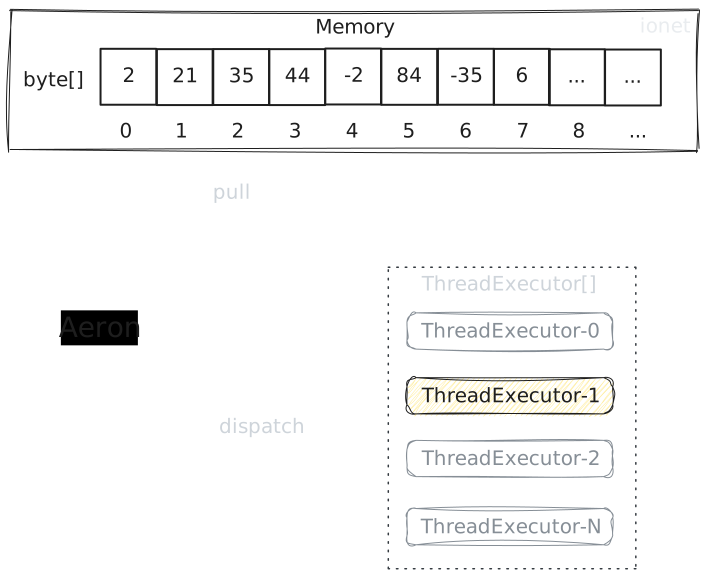
Advantages and Scenarios for Custom Thread Orchestration
The default strategy maps user requests to executors by userId. For newly launched servers, this strategy is generally balanced.
Over time, however, user churn is inevitable. At that point, you can use custom strategies and map executors with other business identifiers. This still keeps execution balanced and avoids some executors staying idle while others are overloaded.
This is just one example scenario. Analyze your own business scenarios and customize accordingly. For instance, you can run an I/O-heavy action on a virtual thread to avoid blocking user threads.
ThreadExecutorRegion
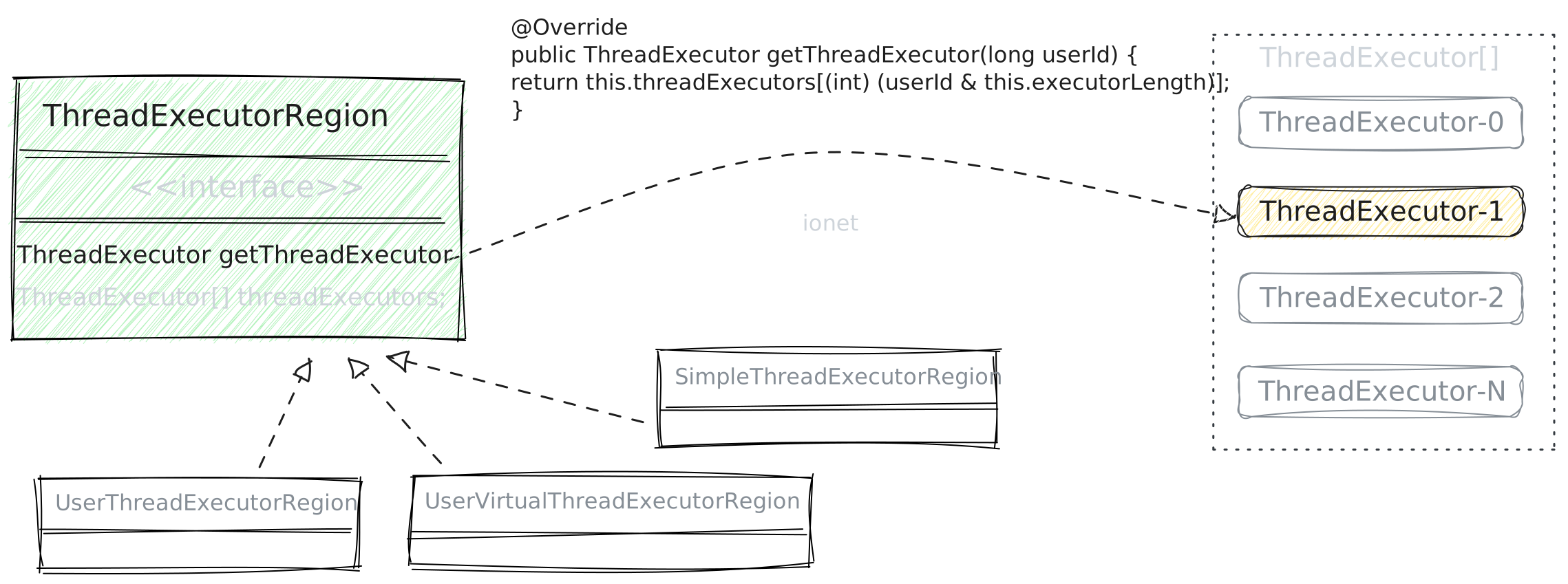
The framework has 3 built-in executor regions:
UserThreadExecutorRegion.UserVirtualThreadExecutorRegion.SimpleThreadExecutorRegion.
Each executor region holds multiple thread executors. Each executor contains only one thread. Thread executors mainly serve two purposes:
- Consume tasks.
- Avoid concurrency conflicts (because each executor is single-threaded).
The executor count in a region is not greater than 2^n of Runtime.getRuntime().availableProcessors().
When availableProcessors is 4, 8, 12, 16, or 32, the corresponding executor count is 4, 8, 8, 16, or 32.
| availableProcessors value | Actual Executor[] value (thread executors) |
|---|---|
| 4 | 4 |
| 8 | 8 |
| 12 | 8 |
| 16 | 16 |
| 32 | 32 |
This design allows quick lookup of the corresponding executor via userId:
final class UserThreadExecutorRegion extends AbstractThreadExecutorRegion {
    ...
    @Override
    public ThreadExecutor getThreadExecutor(long userId) {
        return this.threadExecutors[(int) (userId & this.executorLength)];
    }
}
How to Get ExecutorRegion
Through ExecutorRegion, you can access different executor regions:
UserThreadExecutorRegionUserVirtualThreadExecutorRegionSimpleThreadExecutorRegion
- By BarSkeleton
- By FlowContext
long userId = ...;
BarSkeleton barSkeleton = ...
ExecutorRegion executorRegion = barSkeleton.executorRegion;

executorRegion.getUserThreadExecutor(userId);
executorRegion.getUserVirtualThreadExecutor(userId);
executorRegion.getSimpleThreadExecutor(userId);
var flowContext = ...
ExecutorRegion executorRegion = flowContext.getExecutorRegion();
UserThreadExecutorRegion
This executor region is mainly used to process action requests.
UserThreadExecutorRegion contains multiple user-thread executors.
Each user is bound to one executor to avoid concurrency issues.
Because each executor serves multiple users, do not put long-running blocking tasks here; otherwise other players may be blocked.
Usage Examples
flowContext.executeUser(() -> {
    // your code
});

// or
ExecutorRegion executorRegion =...
executorRegion.getUserThreadExecutor(userId);
UserVirtualThreadExecutorRegion
UserVirtualThreadExecutorRegion is for user virtual-thread executors and is mainly used for I/O-heavy tasks such as DB persistence.
Usage Examples
flowContext.executeVirtual(() -> {
    // your code
});

// or
ExecutorRegion executorRegion =...
executorRegion.getUserVirtualThreadExecutor(userId);
SimpleThreadExecutorRegion
SimpleThreadExecutorRegion is a basic executor region similar to UserThreadExecutorRegion.
If your workload is CPU-intensive and you do not want to consume UserThreadExecutorRegion resources, use this executor.
Usage Examples
ExecutorRegion executorRegion =...
var threadExecutor = executorRegion.getSimpleThreadExecutor(userId);
threadExecutor.executeTry(() -> {
    // your code
});
How to Extend
Custom SkeletonThreadPipeline
public final class MySkeletonThreadPipeline implements SkeletonThreadPipeline {
    @Override
    public void execute(BarSkeleton barSkeleton, FlowContext flowContext) {
        // Your code
    }
}
Add SkeletonThreadPipeline Extension
class OneApplication {
    static void main() {
        RunOne runOne = new RunOne();

        var netServerBuilder = runOne.getNetServerBuilder();
        netServerBuilder.setSkeletonThreadPipeline(new MySkeletonThreadPipeline());

        runOne
            ...
            .startup();
    }
}
Summary
The framework solves concurrency issues for a single player. Even after re-login, the player still uses the same thread for business consumption.
If developers have special business needs, they can extend by overriding the SkeletonThreadPipeline interface.