External Server Design
If you are not interested in the full context/design of the external server and only want usage and extension guidance, please read External Server Introduction.
Lock-free asynchronous and event-driven architecture; truly lightweight. You can build a distributed network communication server without any third-party middleware.
Built-in load balancing, distributed support, and dynamic machine scale-out/scale-in.
| Name | Scaling Mode | Responsibility |
|---|---|---|
| ExternalServer | Distributed | Responsible for user connections and interaction |
| LogicServer | Distributed | Responsible for specific business logic processing |
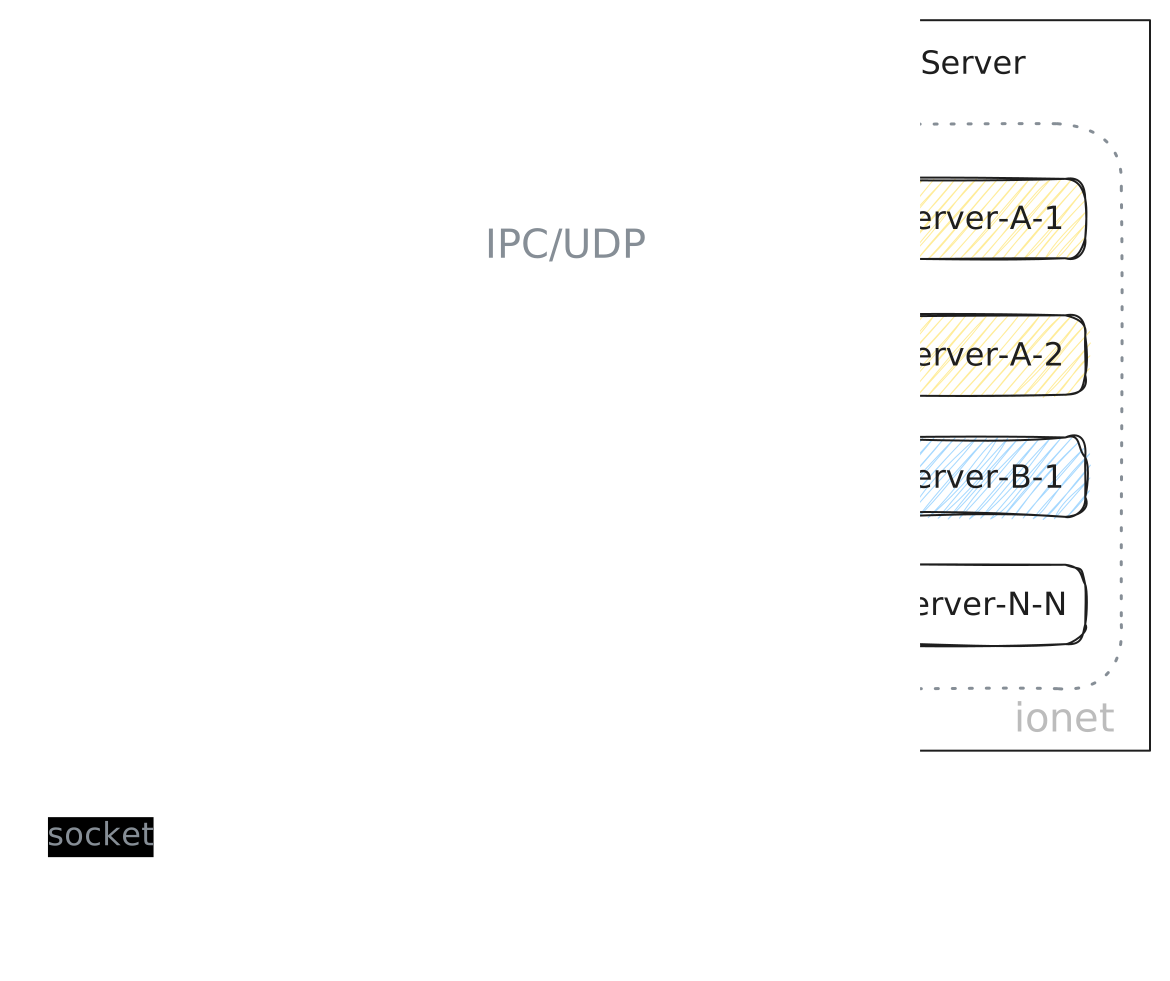
From this architecture overview, we know the overall architecture consists of external services and logic services. They can run independently or be integrated together.
In the architecture diagram, the external server is on the left side (External).
Introduction
To read this section effectively, you should have some Netty knowledge. After this section, you will understand the overall design of the external server. With that overall understanding, you can:
- Extend more connection methods.
- Add custom Netty handlers.
- Integrate third-party communication frameworks. The default external-server implementation uses Netty.
UML
Let's first look at the external-server UML diagram.
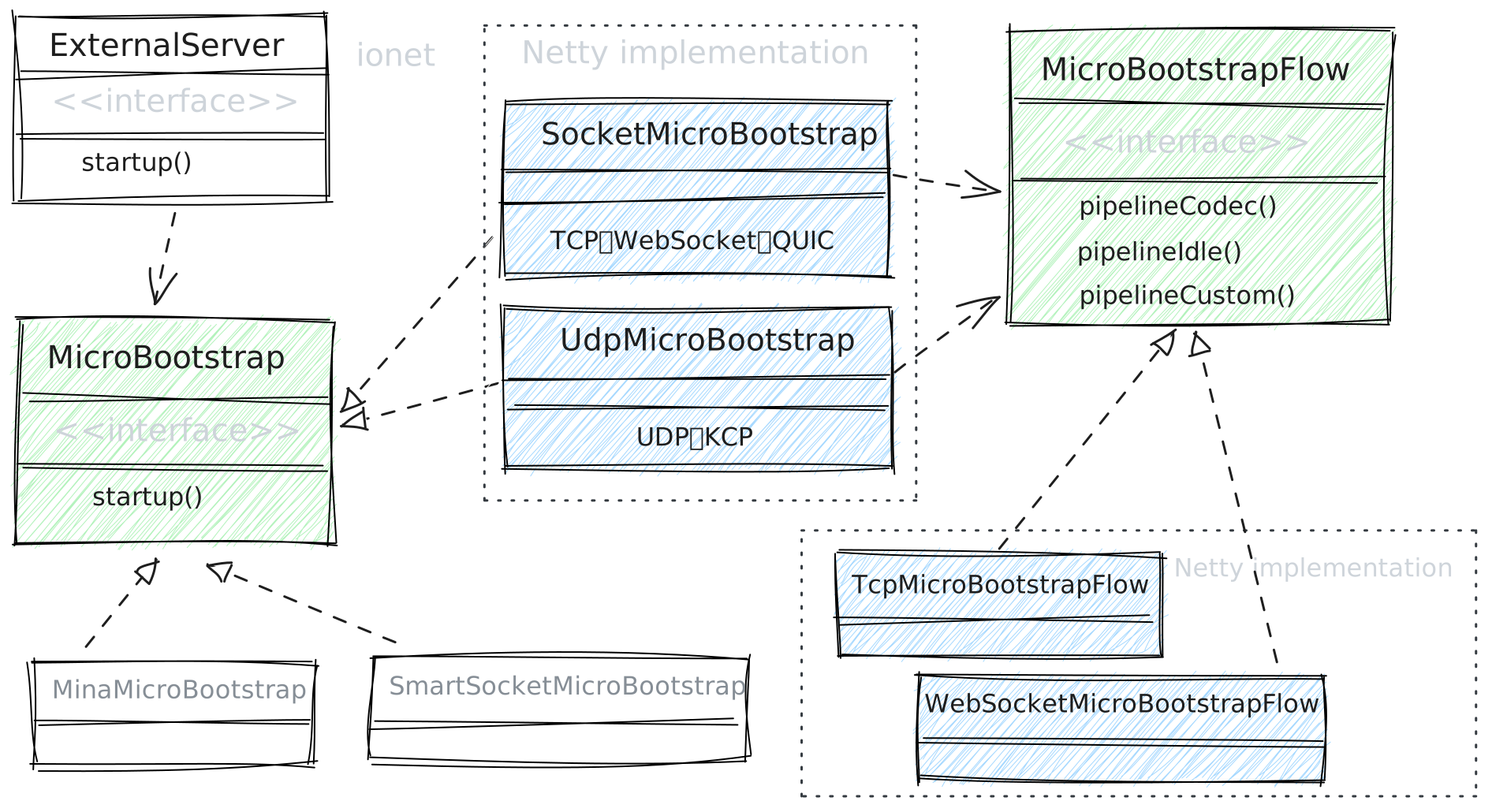
Overall, the external server has only two core interfaces. If you only plan to extend features, you usually only need to focus on MicroBootstrapFlow.
The MicroBootstrapFlow interface is responsible for business orchestration and feature extension, while abstracting connection-method details, such as TCP, WebSocket, UDP, KCP, and QUIC. The framework currently provides Netty-based TCP, WebSocket, and UDP implementations.
The MicroBootstrap interface is responsible for the server that connects to real players, abstracting communication frameworks such as Netty, Mina, and smart-socket. The framework currently provides a Netty-based implementation.
MicroBootstrap
The MicroBootstrap interface is responsible for the server that connects to real players, abstracting communication frameworks such as Netty, Mina, and smart-socket. The framework currently provides a Netty-based implementation.
If needed, developers can implement external server support based on Mina, smart-socket, or other communication frameworks. Even when using Mina/smart-socket-based external-server implementations, existing logic-server business logic is unaffected. This is because the external server follows single-responsibility design and only handles user-connection maintenance.
This design makes external-server extension simpler and more flexible.
MicroBootstrapFlow
MicroBootstrapFlow is the interface developers interact with most during extension.
Responsibilities: business orchestration, feature extension, and abstracting connection-method details, such as TCP, WebSocket, UDP, KCP, and QUIC. The framework currently provides Netty-based TCP, WebSocket, and UDP implementations. Developers can extend additional connection methods such as TCP, WebSocket, UDP, KCP, and QUIC.
Through this interface, you can add custom Netty handlers to tailor business behavior for your project.
Business orchestration has two phases: build-time and on new connection.
- createFlow: build-time, before the server starts. This method executes build-time flow and calls
optionandchannelInitializer.option: configure server options.channelInitializer: define business orchestration.
- pipelineFlow: on new connection, after the server has started. Triggered each time a new connection arrives.
This method executes new-connection flow and calls
pipelineCodec,pipelineIdle, andpipelineCustom.pipelineCodec: codec-related orchestration.pipelineIdle: heartbeat-related orchestration.pipelineCustom: custom business orchestration.
Connection Methods
Currently, the framework provides TCP, WebSocket, and UDP connection methods, and supports switching among them without impacting business code.
| Connection Method | Provided by Framework |
|---|---|
| TCP | ✅ |
| WebSocket | ✅ |
| UDP | ✅ Enterprise Feature |
| KCP | ❌ (Planned) |
| QUIC | ❌ (Planned) |
Extend Connection Methods
MicroBootstrapFlow is also straightforward to extend. For the external server's connectionless UDP extension,
only 400+ lines of Java were needed to complete compatibility with TCP/WebSocket (including route permission, heartbeat, UserSession management, etc.).
This suggests future KCP/QUIC extension will also be straightforward.
| Connection Feature | Class Name | Provided Methods | Planned Methods |
|---|---|---|---|
| Stateful | SocketMicroBootstrap | TCP, WebSocket | QUIC |
| Stateless | UdpMicroBootstrap | UDP | KCP |
channelInitializer
When initializing Netty ChannelInitializer, this method calls pipelineFlow.
pipelineFlow then orchestrates pipelineCodec, pipelineIdle, and pipelineCustom by default.
Developers may override any of these methods, but in most cases overriding pipelineCustom is enough for strong extensibility.
pipelineCodec: codec orchestration.pipelineIdle: heartbeat orchestration.pipelineCustom: custom business orchestration. In most cases, overriding this alone is sufficient.
abstract class AbstractSocketMicroBootstrapFlow implements MicroBootstrapFlow<ServerBootstrap> {
    ...
    @Override
    public void channelInitializer(ServerBootstrap bootstrap) {
        bootstrap.childHandler(new ChannelInitializer<SocketChannel>() {
            @Override
            protected void initChannel(SocketChannel ch) {
                pipelineFlow(new DefaultPipelineContext(ch, setting));
            }
        });
    }
}

public interface MicroBootstrapFlow<Bootstrap> extends ExternalSettingAware {
    ...
    void channelInitializer(Bootstrap bootstrap);

    default void pipelineFlow(PipelineContext pipelineContext) {
        pipelineCodec(pipelineContext);
        pipelineIdle(pipelineContext);
        pipelineCustom(pipelineContext);
    }
}
pipelineCustom
pipelineCustom is the custom business-orchestration method. By overriding it, developers can arrange their own handlers to satisfy project-specific needs.
By default, the framework adds some built-in Netty handlers in pipelineCustom.
@FieldDefaults(level = AccessLevel.PROTECTED)
abstract class AbstractSocketMicroBootstrapFlow implements MicroBootstrapFlow<ServerBootstrap> {
    ...
    @Override
    public void pipelineCustom(PipelineContext context) {
        if (ExternalGlobalConfig.enableLoggerHandler) {
            context.addLast("SimpleLoggerHandler", SimpleLoggerHandler.me());
        }

        // Check for route existence.
        context.addLast("CmdCheckHandler", CmdCheckHandler.me());

        // UserSession
        SocketUserSessionHandler socketUserSessionHandler = setting.option(SettingOption.socketUserSessionHandler);
        context.addLast("UserSessionHandler", socketUserSessionHandler);

        // Route access authentication
        SocketCmdAccessAuthHandler socketCmdAccessAuthHandler = setting.option(SettingOption.socketCmdAccessAuthHandler);
        context.addLast("CmdAccessAuthHandler", socketCmdAccessAuthHandler);

        // ExternalServer data cache
        if (ExternalGlobalConfig.externalCmdCache != null) {
            context.addLast("CmdCacheHandler", CmdCacheHandler.me());
        }

        // Forward the request to the logic server.
        var userRequestHandler = setting.option(SettingOption.userRequestHandler);
        context.addLast("UserRequestHandler", userRequestHandler);
    }
}
How to Extend Netty Handler
Write a custom Netty handler, then add it to the pipeline.
public final class MyNettyHandler extends ChannelInboundHandlerAdapter {
    @Override
    public void channelRead(ChannelHandlerContext ctx, Object msg) throws Exception {
        System.out.println("hello:" + msg);
        super.channelRead(ctx, msg);
    }
}
Override pipelineCustom and add MyNettyHandler to the pipeline.
- code 10: add custom
MyNettyHandler. - code 11: keep framework default orchestration.
private static ExternalServer ofExternalServer() {
    var externalServerBuilder = MyExternalServer.builder(
                ExternalGlobalConfig.externalPort
                , ExternalJoinEnum.WEBSOCKET
    );

    externalServerBuilder.setMicroBootstrapFlow(new WebSocketMicroBootstrapFlow(){
        @Override
        public void pipelineCustom(PipelineContext context) {
            context.addLast(new MyNettyHandler());
            super.pipelineCustom(context);
        }
    });

    return externalServerBuilder.build();
}
When overriding methods, pay attention to the connection type in use.
ExternalJoinEnum.WEBSOCKET: corresponds toWebSocketMicroBootstrapFlow.ExternalJoinEnum.TCP: corresponds toTcpMicroBootstrapFlow.
When to Override Which Methods
- If default codec behavior cannot satisfy your business, override
pipelineCodec. - If default heartbeat behavior cannot satisfy your business, override
pipelineIdle. - If default built-in handler behavior cannot satisfy your business, or you want feature enhancement, override
pipelineCustom. - If
pipelineCodec,pipelineIdle, andpipelineCustomall cannot satisfy your business, overridepipelineFlowdirectly. - The same principle applies to other methods.
Summary
We introduced the two core interfaces MicroBootstrap and MicroBootstrapFlow, along with their responsibilities.
MicroBootstrap: the server connected to real players, abstracting communication frameworks (Netty, Mina, smart-socket). Default implementation is Netty-based.MicroBootstrapFlow: responsible for business orchestration, feature extension, and abstracting connection-method details.
Feature extension and business orchestration in MicroBootstrapFlow are simple: in most cases, only override pipelineCustom.