EventBus
Introduction
The distributed event bus is one of the communication methods provided by the framework. It is similar to products such as Guava EventBus, Redis pub/sub, and MQ.
If Redis or MQ middleware is used, developers must additionally install and maintain those middleware services and pay for machine resources. Guava EventBus can only communicate within the current process and cannot work across processes. The framework's distributed event bus combines the advantages of both. In addition, it can effectively help enterprises reduce cloud spending on Redis and MQ.
After an event is published, not only subscribers in the current process can receive it, but remote subscribers can also receive it (across machines, across processes, and across multiple different logic server types). It can replace Redis pub/sub or MQ, and it supports full-link call log tracing, which middleware products cannot provide.
Features of ionet distributed event bus
- Usage style is similar to Guava EventBus
- Supports full-link call log tracing (middleware products cannot do this)
- Supports communication across multiple machines and multiple processes
- Supports communication with multiple logic servers of different types
- Pure Java SE, no dependency on other services, low coupling (no middleware installation required)
- Event sources and listeners communicate through events, enabling module decoupling
- When there are no remote subscribers, no network request is triggered (middleware products cannot do this)
Although the distributed event bus emphasizes cross-process and cross-machine capability, subscribers in the same process are also effective. A notable point is that no network request is triggered if there are no remote subscribers. In short, after an event is published, if there are no relevant subscribers in other processes (or other machines), the event is only passed in memory to subscribers in the current process. So you can also use this communication model as Guava EventBus.
Usage Scenarios
For usage scenarios, you can search for Guava EventBus related examples. The strength of the distributed event bus is that once an event is published, subscribers can receive it even if they are on different machines, different processes, or different logic servers.
Scenario-1
After a player logs in, publish a login event. Subscribers in logic servers of other processes can receive this event and perform business operations such as:
- Record player login time.
- Compute reward logic based on current time and last login time, such as offline rewards.
- Other business processing.
Scenario-2
For example, put statistics collection into a dedicated statistics collection logic server and add related subscribers.
The framework has built-in statistics plugins. After developers collect these statistics, they can publish them as events. No matter where the statistics collection logic server is deployed, it can receive the statistics event. After receiving it, data can be persisted or logged.
Concept Introduction
The distributed event bus provided by the framework is simple to use. It has only 3 basic concepts:
- EventSource: event source
- Subscriber: subscriber
- Fire: publish event
Defining Event Sources
Event sources are defined by developers. They are business data carriers used mainly for business data transport.
@ProtobufClass
public class UserLoginEventMessage {
    public long userId;

    public static UserLoginEventMessage of(long userId) {
        var message = new UserLoginEventMessage();
        message.userId = userId;
        return message;
    }
}
Event sources need the @ProtobufClass annotation because remote calls may be involved.
Subscriber
Subscribers are defined by developers and are used to receive event sources and process business logic.
You only need to add the EventSubscribe annotation to a method to make it a subscriber.
The framework provides two annotation markers for subscribers:
EventBusSubscriber, used on class level (not required).EventSubscribe, used on method level.
@EventBusSubscriber
public class EmailEventBusSubscriber {
    @EventSubscribe
    public void mail(UserLoginEventMessage message) {
        log.info("EmailEventBus {}", message.userId);
    }
}

@EventBusSubscriber
public class UserEventBusSubscriber {
    @EventSubscribe
    public void userLogin(UserLoginEventMessage message) {
        log.info("UserEventBus {}", message.userId);
    }
}
In EmailEventBusSubscriber and UserEventBusSubscriber, we each provide subscribers for UserLoginEventMessage.
When a related UserLoginEventMessage event is triggered, all relevant subscribers can receive it.
The EventBusSubscriber annotation on the subscriber class is optional and does not affect behavior.
It is only a marker to help quickly locate subscriber classes with development tools.
Subscriber creation rules
- The method must be public void.
- The subscriber method must have exactly one parameter, used to receive the event source.
- The method must add the EventSubscribe annotation.
How to Use
EventBus, business framework, and logic server are in a 1:1:1 relationship.
Use the framework addRunner method to add the distributed event bus (Runner mechanism).
EventBus supports registering multiple subscribers. Here we register EmailEventBusSubscriber to EventBus.
- code 5~8: enable EventBus and register
EmailEventBusSubscriberinto EventBus.
public final class EmailLogicServer implements LogicServer {
    @Override
    public void settingBarSkeletonBuilder(BarSkeletonBuilder builder) {
        // add EventBusRunner
        builder.addRunner((EventBusRunner) (eventBus, _) -> {
            // event bus
            eventBus.register(new EmailEventBusSubscriber());
        });
    }
}
Publishing Events
Purpose: send event sources to relevant subscribers.
For event publishing, EventBus provides synchronous and asynchronous publishing methods.
| Async | Sync | Description |
|---|---|---|
| fire | fireSync | Send events to subscribers, including: 1. Subscribers of all logic servers in the current process 2. Subscribers in other processes |
| fireLocal | fireLocalSync | Send events to subscribers of all logic servers in the current process |
| fireMe | fireMeSync | Send events only to subscribers of the current EventBus |
| fireAny | fireAnySync | Send events to subscribers, including: 1. Subscribers of all logic servers in the current process 2. Subscribers in other processes When there are multiple logic servers of the same type, the event is sent to only one of them. |
fireMe sends event messages only to subscribers of the current EventBus. Each logic server has its own EventBus object. When you only want to send events to subscribers of the current logic server, this method is useful.
public void demo() {
    FlowContext flowContext = ...
    var message = UserLoginEventMessage.of(userId);
    flowContext.fireMe(message);
    flowContext.fireMeSync(message);
}
fireLocal sends event messages to subscribers of all logic servers in the current process, and does not send to logic servers in other processes.
Example: if user logic server and email logic server run in the same process,
fireLocalsends events to both.
public void demo() {
    FlowContext flowContext = ...
    var message = UserLoginEventMessage.of(userId);
    flowContext.fireLocal(message);
    flowContext.fireLocalSync(message);
}
After fire publishes an event, subscribers in both the current process and other machines can receive it.
public void demo() {
    FlowContext flowContext = ...
    var message = UserLoginEventMessage.of(userId);
    flowContext.fire(message);
    flowContext.fireSync(message);
}
Although fireSync provides a synchronous method, here "synchronous" only applies to subscribers in the current process, not subscribers in other processes (remote subscribers are handled asynchronously).
So when calling fireSync,
it synchronously blocks to send events to subscribers of all logic servers in the current process and waits for subscriber execution to complete,
while sending event messages asynchronously to subscribers in other processes.
fireAny publishes an event so both current-process subscribers and remote-process subscribers can receive it. When there are multiple logic servers of the same type, the event is sent to only one of them.
Example: Assume there is an email logic server that sends rewards, and we start two (or more) instances to process business. When
fireAnyis used, only one instance receives the event.
public void demo() {
    FlowContext flowContext = ...
    var message = new UserLoginEventMessage(userId);
    flowContext.fireAny(message);
    flowContext.fireAnySync(message);
}
EventBus
For event publishing above, we used FlowContext, and internally it is still handled by EventBus.
Sometimes in special business scenarios, EventBus is used directly. Below is an example of how to get the EventBus object.
Via FlowContext
public class EventBusAction {
    private void settingEventBus(FlowContext flowContext) {
        MyKit.eventBus = flowContext.getEventBus();
    }
}

public class MyKit {
    public static EventBus eventBus;
}
Via LogicServer
public final class EmailLogicServer implements LogicServer {
    @Override
    public void settingBarSkeletonBuilder(BarSkeletonBuilder builder) {
        builder.addRunner((EventBusRunner) (eventBus, skeleton) -> {
            MyKit.eventBus = eventBus;
            // or
            MyKit.eventBus = skeleton.eventBus;
        });
    }
}
How to choose between EventBus and FlowContext?
Usually, if published events are related to player business, it is recommended to use event publishing methods provided by FlowContext. Because events published through FlowContext have full-link call log tracing. For business unrelated to players, EventBus can be used.
Subscriber Thread Executor
This section is optional. It is only needed in special cases, such as thread orchestration and subscriber execution order orchestration.
The distributed event bus supports thread executor selection strategies. Subscribers can specify which executor consumes the business.
The distributed event bus provides the following thread executor strategies:
userExecutor(usesUserThreadExecutorRegion) [default strategy]userVirtualExecutor(usesUserVirtualThreadExecutorRegion)methodExecutor(usesSimpleThreadExecutorRegion)simpleExecutor(usesSimpleThreadExecutorRegion)customExecutor(usesSimpleThreadExecutorRegion)
UserVirtualThreadExecutorRegion,
UserThreadExecutorRegion,
and SimpleThreadExecutorRegion are built-in framework executors.
As introduced earlier, adding EventSubscribe to a method makes it a subscriber.
EventSubscribe provides two optional attributes:
value: executor selection strategy, default isuserExecutor.order: subscriber execution order. Greater value means higher priority.
@Documented
@Retention(RetentionPolicy.RUNTIME)
@Target(ElementType.METHOD)
public @interface EventSubscribe {

    ExecutorSelector value() default ExecutorSelector.userExecutor;

    int order() default 0;
}
userExecutor Strategy (Default)
This strategy is thread-safe and is the default strategy.
It uses UserThreadExecutorRegion to execute subscriber business,
and internally selects corresponding executors via userId.
This strategy uses the action thread executor, ensuring the same user uses the same executor when consuming both events and actions, avoiding concurrency issues.
Recommended scenarios
Use this strategy if subscriber business is user-related and has concurrency risks. After using this strategy, subscriber execution and user action execution happen in the same thread to avoid concurrency issues.
@EventBusSubscriber
public class UserEventBusSubscriber {
    @EventSubscribe
    public void userLogin(UserLoginEventMessage message) {
        // your biz code
    }
}
Do not execute long-running tasks in this executor to avoid blocking action consumption.
userVirtualExecutor Strategy
This strategy uses UserVirtualThreadExecutorRegion (virtual thread executor) to execute subscriber business, and internally maps by userId.
Recommended scenarios
Choose this strategy for time-consuming business, such as DB writes, IO, and other costly operations.
@EventBusSubscriber
public class EmailEventBusSubscriber {
    @EventSubscribe(ExecutorSelector.userVirtualExecutor)
    public void mail(UserLoginEventMessage message) {
        // your biz code
    }
}
methodExecutor Strategy
This strategy is thread-safe and uses SimpleThreadExecutorRegion to execute subscriber business.
In the example below, no matter which user triggers it, the subscriber runs on the same thread.
@EventBusSubscriber
public class EmailEventBusSubscriber {
    @EventSubscribe(ExecutorSelector.methodExecutor)
    public void methodExecutor(EmailMethodEventMessage message) {
        // your biz code
    }
}
Thread safety here is method-scoped: the same subscriber method always uses the same thread executor.
simpleExecutor Strategy
This strategy is thread-safe. It is similar to userExecutor, but uses an independent executor (SimpleThreadExecutorRegion).
It uses SimpleThreadExecutorRegion to execute subscriber business and maps to executors via userId.
customExecutor Strategy
customExecutor is reserved for developer-defined strategies. By default, it behaves like simpleExecutor.
If the strategies above cannot satisfy business needs, developers can implement SubscribeExecutorStrategy for custom extension.
builder.addRunner((EventBusRunner) (eventBus, _) -> {
    eventBus.setSubscribeExecutorStrategy(new YourSubscribeExecutorStrategy());
});
Subscriber Execution Order
The same event source may be subscribed by multiple subscribers. In some scenarios, subscriber execution priority is required. The EventSubscribe annotation supports priority configuration.
In the example below, priority is set through EventSubscribe.order; larger values have higher execution priority.
@EventBusSubscriber
public class CustomSubscriber {
    @EventSubscribe(order = 1, value = ExecutorSelector.simpleExecutor)
    public void myMessage1(MyMessage message) {
        log.info("###myMessage1 : {}", message);
    }

    @EventSubscribe(order = 3, value = ExecutorSelector.simpleExecutor)
    public void myMessage3(MyMessage message) {
        log.info("###myMessage3 : {}", message);
    }

    @EventSubscribe(order = 2, value = ExecutorSelector.simpleExecutor)
    public void myMessage2(MyMessage message) {
        log.info("###myMessage2 : {}", message);
    }
}

@ProtobufClass
public class MyMessage {
    public String name;
}
EventBusListener
The EventBusListener interface can handle special cases such as exceptions and empty subscribers.
invokeException: invoked when a subscriber throws an exception while consuming an event source.emptySubscribe: invoked when an event source is published but no subscriber has subscribed to it.
A quick emptySubscribe example:
Suppose we have an independent reward logic server subscribed to a login event source.
When a player logs in (login logic server), an event source is published.
If the reward logic server is offline or just went down, emptySubscribe is triggered (because there is no subscriber for that event).
Developers can use this feature to record such events and process them later.
final class MyEventBusListener implements EventBusListener {
    @Override
    public void invokeException(Throwable e, Object eventSource, EventBusMessage eventBusMessage) {
        log.error(e.getMessage(), e);
    }

    @Override
    public void emptySubscribe(EventBusMessage eventBusMessage, EventBus eventBus) {
        Class<?> clazz = eventBusMessage.getTopicClass();
        String simpleName = eventBusMessage.getTopic();
        log.warn("[No subscribers: {} - {}", clazz.getSimpleName(), simpleName);
    }
}
Set custom listener
BarSkeletonBuilder builder = ...;

builder.addRunner((EventBusRunner) (eventBus, _) -> {
    ...
    eventBus.setEventBusListener(new MyEventBusListener());
});
Summary
The distributed event bus provided by ionet is simple to use, with only 3 basic concepts:
- EventSource: event source
- Subscriber: subscriber
- fire: publish event
Distributed event bus features
- Usage style is similar to Guava EventBus
- Supports full-link call log tracing (middleware products cannot do this)
- Supports communication across multiple machines and multiple processes
- Supports communication with multiple logic servers of different types
- Pure Java SE, no dependency on other services, low coupling (no middleware installation required)
- Event sources and listeners communicate through events, enabling module decoupling
- When there are no remote subscribers, no network request is triggered (middleware products cannot do this)
Although the distributed event bus emphasizes cross-process and cross-machine capability, subscribers in the same process are also effective. A notable point is that if there are no remote subscribers, no network request is triggered. In short, after an event is published, if there are no relevant subscribers in other processes (or machines), the event is only passed in memory to subscribers in the current process. So this communication model can be used as Guava EventBus.
EventBus provides synchronous and asynchronous methods such as fireMe, fireLocal, fire, and fireAny for event publishing.
Subscribers support thread executor strategy selection and execution priority configuration. By default, the user thread executor strategy is used. For subscriber execution order (priority), larger values mean higher priority.
To ensure ordered execution, subscribers need to use the same thread executor.
For example, strategies such as userExecutor and simpleExecutor can be used together.
Integration with Spring
If subscriber classes are managed by Spring, you can first obtain subscriber instances from Spring ApplicationContext, then register them into EventBus.
More Examples
In the sections above, we covered several distributed event bus use cases, but with limited imagination. In this section, we introduce more imaginative use cases. The key point is making full use of the distributed event bus.
Hot Update
As we know, when events are published by fire, all subscribers can receive them.
With this property, we can perform batch hot updates on the system.
@ProtobufClass
public class MyHotMessage {
    public byte[] hotCode;
}

@EventBusSubscriber
public class HotEventBusSubscriber {
    @EventSubscribe(ExecutorSelector.userVirtualExecutor)
    public void hot(MyHotMessage message) {
        byte[] hotCode = message.hotCode;
        ...
    }
}
When hot-updating business logic, publish a HotMessage event from GM backend, where hotCode stores the bytecode to hot-update (precompiled class).
Because events are published via fire, all relevant subscribers can receive them.
Even with hundreds of logic server instances, batch updates can still be done easily.
Global Configuration File
This case is similar to hot update and simulates global config updates.
@ProtobufClass
public class MyConfigMessage {
    ... your config property
}

@EventBusSubscriber
public class ConfigEventBusSubscriber {
    @EventSubscribe(ExecutorSelector.userVirtualExecutor)
    public void updateConfig(MyConfigMessage message) {
        ...
    }
}
Pluggability
As we know, in the distributed event bus, if there are no remote subscribers, no network request is triggered. With this characteristic, we can build special business features such as temporary events.
Business scenario of this temporary event: During the event period, if a player is online for 60 minutes daily, the system grants rewards. (Detection is done each login by publishing an event in login logic.)
We can create a dedicated logic server for this temporary event, i.e., temporary event logic server. This logic server only configures subscribers for player login event sources. The point is: when the temporary event ends, just take this logic server offline, with no additional work.
When the temporary event logic server goes offline, it means there are no subscribers. Even if events are published, no network request is triggered. Therefore, this characteristic of the distributed event bus gives the system pluggability. If this temporary event needs to be restarted later, simply start that logic server again.
From this, you can see we only added one event publishing point in login business. Later, business can be extended by starting/stopping the temporary event logic server, and this does not affect core business. Most importantly, network requests are triggered only when that logic server is online. When that logic server is offline, no network request is triggered. This is something middleware like redis pub/sub or MQ cannot achieve.
Summary
Finally, use your imagination and make full use of the distributed event bus. Only when it is used flexibly does it become more valuable.
After introducing pluggability into the system, we can split more features into independent functional logic servers for future use. For example, when special business is triggered, temporarily starting these feature logic servers can make game experiences more interesting.
Example Source Code
see https://github.com/iohao/ionet-cookbook-code-enterprise
- EnterpriseOneApplication
- EnterpriseOneApplication2
- EnterpriseOneApplication3
- EventBusAction
- EventBusRegion
Simulation Client
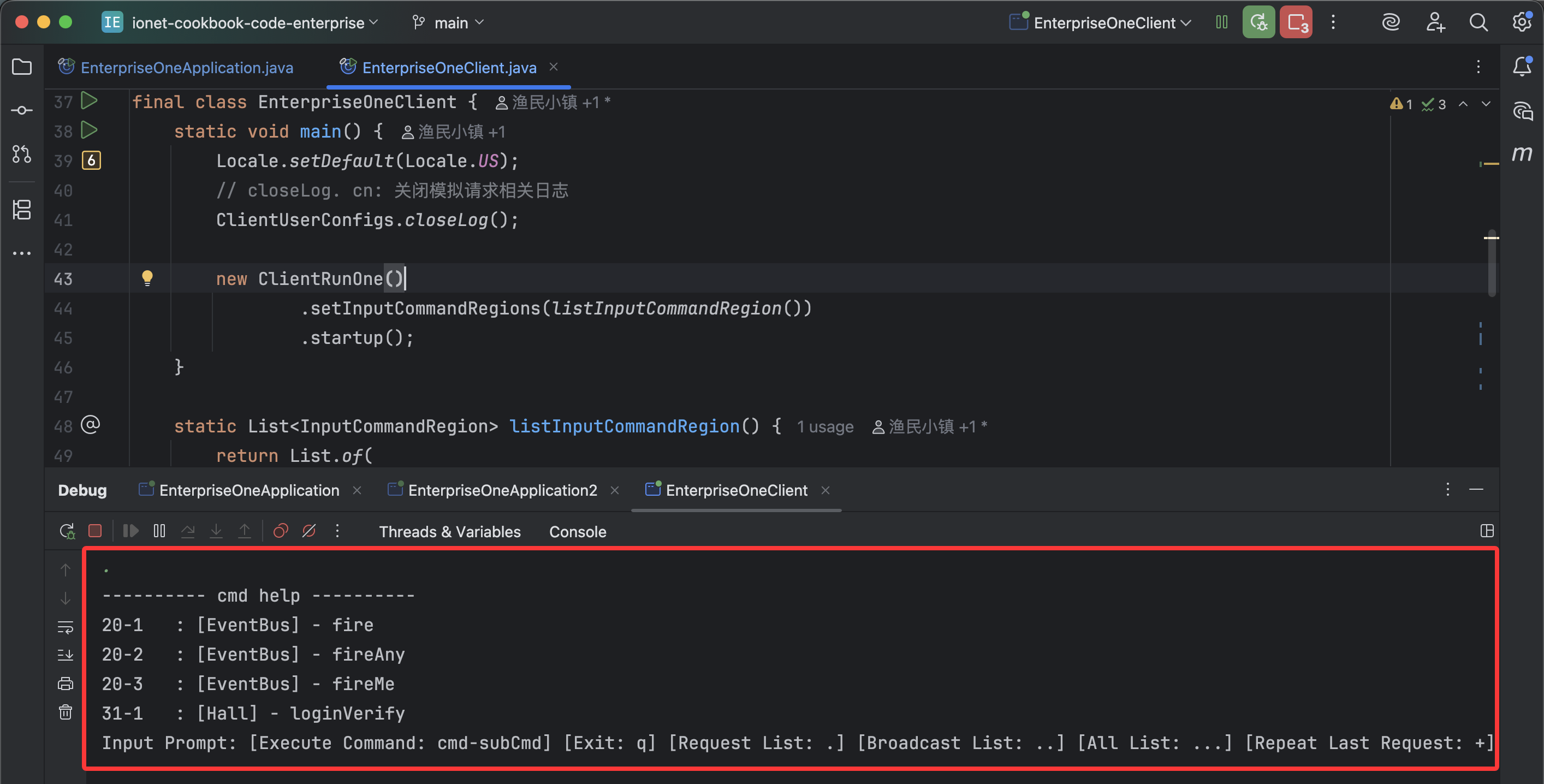
The simulation client example provides multiple request commands. Developers can input commands for testing.
For example, input 20-2 to trigger fireAny, and the event bus sends the event to only one email logic server.
Enterprise Feature
This is an enterprise feature