Dynamically Bind Logic Servers
Introduction
Dynamic logic-server binding means that after a user is bound to a logic server, subsequent requests are handled by that logic server. This can implement effects similar to dynamic room allocation after matchmaking in games like LoL or Honor of Kings.
Problems Solved
Dynamic logic-server binding solves user growth and scaling issues. A single machine has compute limits. When limits are reached, new machines are needed to share request load. If your business is stateful, how do you solve request allocation? For example, if you build LoL/Honor-of-Kings-like matchmaking and need matched users handled in the same room, how do you ensure their subsequent requests are processed on the same logic server?
Using framework dynamic logic-node binding solves this easily. Based on business rules, you can calculate the most idle logic server and bind users to it, so machine resources are balanced and request skew is avoided.
Example Scenarios
What does this mean? Here is a matchmaking + chess example.
Assume 3 chess logic servers are deployed. Before users start the game, they are matched in a matchmaking server.
After matchmaking server matches users A and B, we can use request/multiple_response communication model to get the chess logic server with the fewest rooms.
Assume the server with the fewest rooms is ChessLogicServer-2. Bind its logic server ID to users A and B. Then chess-related operation requests are handled by ChessLogicServer-2, such as game start, moving pieces, captures, and draws.
You can also view this simply as LoL/Honor-of-Kings matchmaking. After matching users, all users in the result are assigned to one room (node), which is one usage of dynamically allocating the least-loaded resource node (logic server).
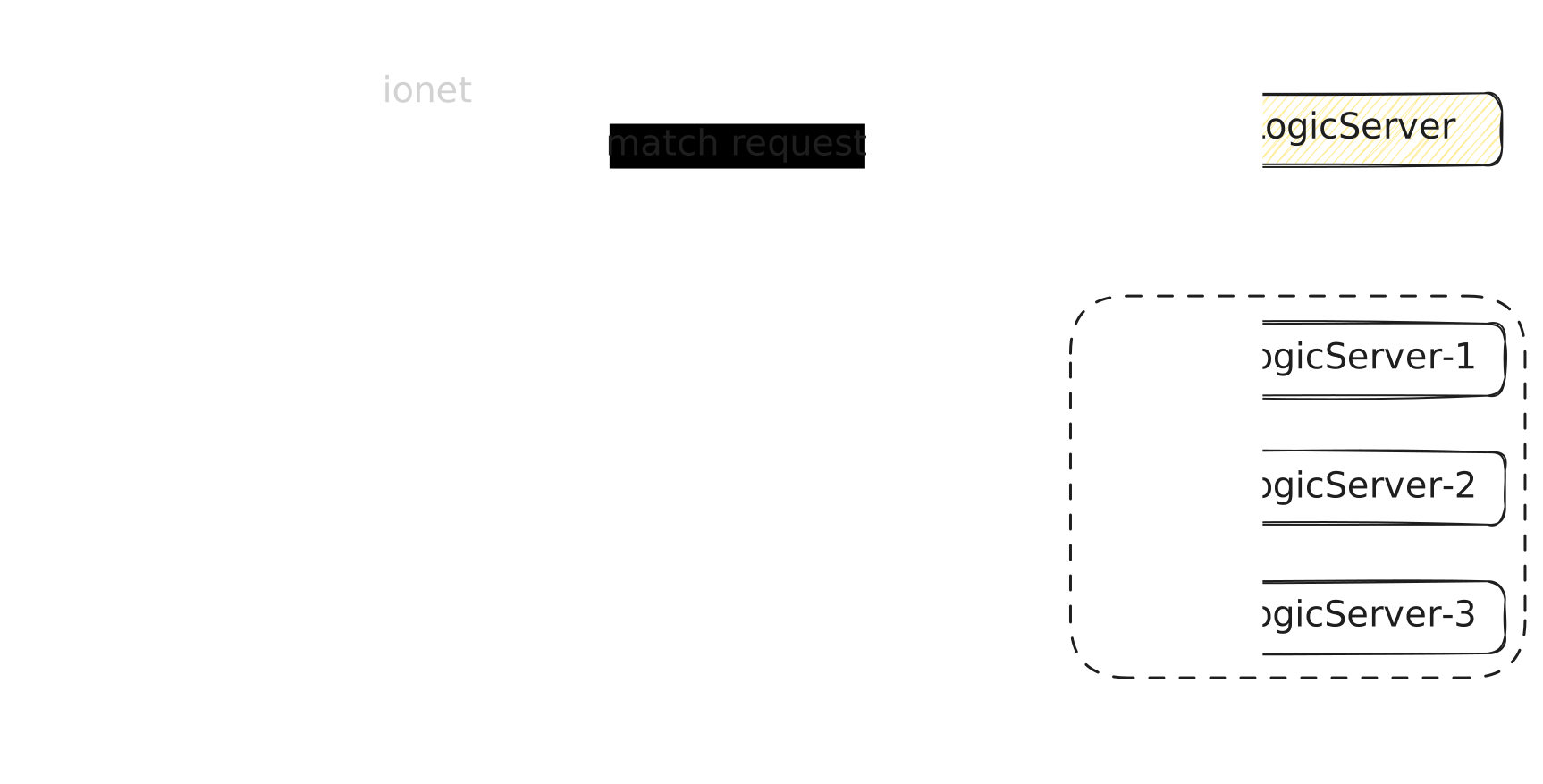
Matching Diagram
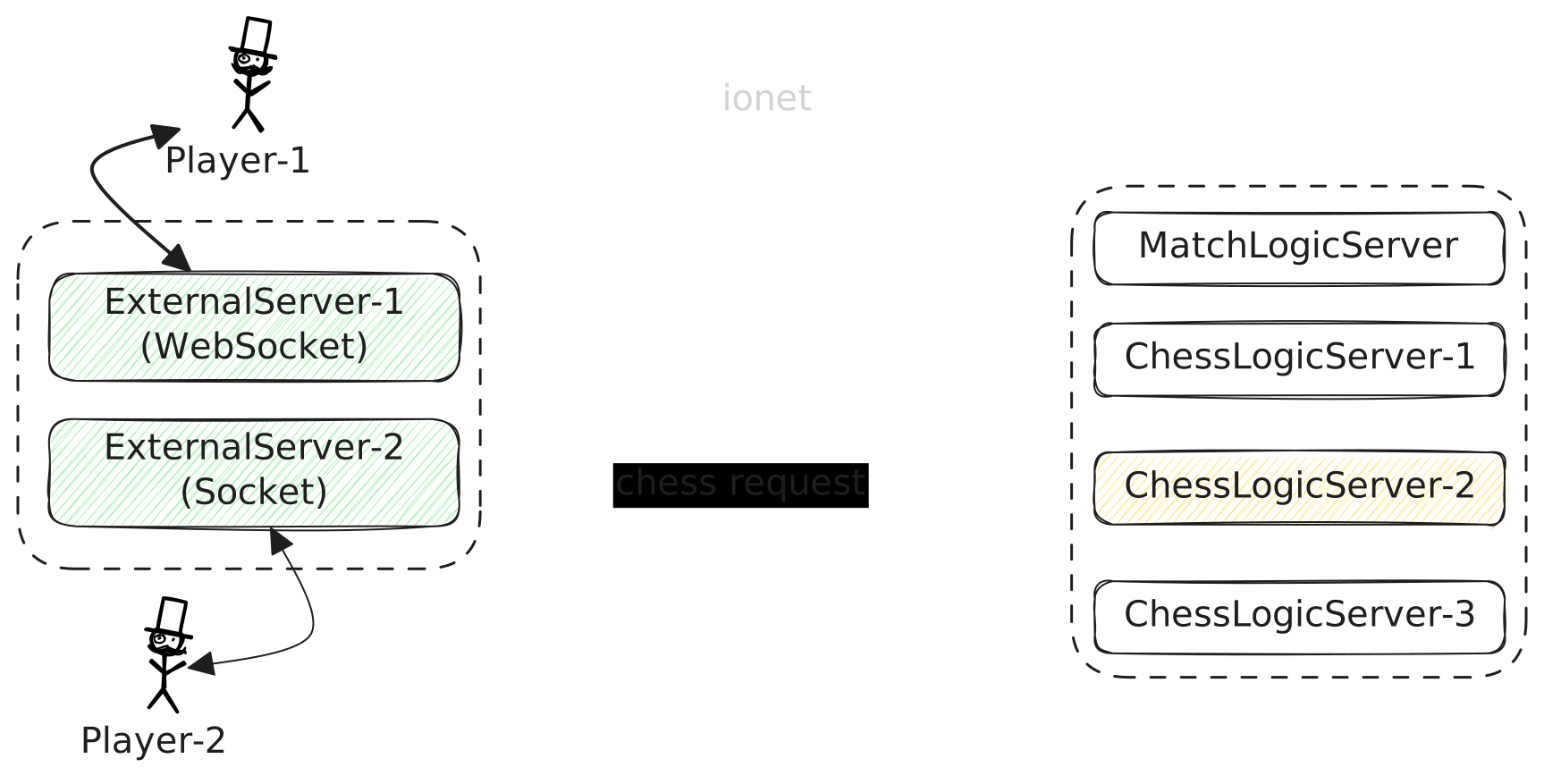
- Player-1, Player-2: user 1 and user 2, referred to as users A and B.
- ExternalServer-1, ExternalServer-2: external servers.
- ChessLogicServer: chess logic server.
- MatchLogicServer: matchmaking logic server.
- match request: matchmaking request.
In the diagram, user 1 and user 2 may be connected to different external servers, and both send matchmaking requests. The matchmaking logic server handles this. Assume ChessLogicServer-2 has the fewest rooms, then bind its logic server ID to users A and B.
Operation Diagram
- chess request: chess-related operation request.
After users are bound to ChessLogicServer-2, all chess-related operation requests are handled by ChessLogicServer-2, such as game start, moving pieces, captures, and draws.
This can also be understood as LoL/Honor-of-Kings-like matchmaking. After users are matched, all users in the match result are assigned into one room.
Example Source Code
Example contains
- Match logic server (2 actions)
- Login verification request
- Matchmaking request
- Room logic server (2 actions)
- Count current room requests
- Receive operation requests
- One simulated client (3 requests)
- Login request
- Matchmaking request
- Repeatedly send operation requests to room logic server
Server startup includes
- Start 2 instances of room logic server
- Start 1 matchmaking logic server
- Start 1 external server
In simulated client, users request matchmaking after login.
After users are matched, matchmaking logic server uses request/multiple_response model to get the room logic server with the fewest rooms. It binds that logic server ID to users A and B, and then all room-related requests are handled by that room logic server.
Then the user sends an operation request to server every few seconds,
and request enters DemoEndPointRoomAction.operation in room logic server.
Key Code Explanation
Dynamic logic-server binding code:
- code 4~7:
bindingPrint, print bound logic servers for user. - code 10~22:
bindingCover, override binding. - code 25~37:
bindingAppend, append binding. - code 40~51:
bindingRemove, remove binding. - code 54~64:
bindingClear, clear all bindings.
@ActionController(BindingCmd.cmd)
public class BindingAction {
    @ActionMethod(BindingCmd.bindingPrint)
    private List<Integer> bindingPrint(FlowContext flowContext) {
        int[] bindingLogicServerIds = flowContext.getRequest().getBindingLogicServerIds();
        return ArrayKit.toList(bindingLogicServerIds);
    }

    @ActionMethod(BindingCmd.bindingCover)
    private boolean bindingCover(FlowContext flowContext) {
        // Cover binding
        long[] userIds = {1L, flowContext.getUserId()};
        int[] logicServerIds = {1, 2, 3};

        var message = BindingLogicServerMessage.builder(BindingEnum.COVER)
                .addLogicServerId(logicServerIds)
                .addUserId(userIds)
                .build();

        var response = communication().bindingLogicServer(message);
        return response.isSuccess();
    }

    @ActionMethod(BindingCmd.bindingAppend)
    private boolean bindingAppend(FlowContext flowContext) {
        // Append binding
        long[] userIds = {1L, flowContext.getUserId()};

        int[] logicServerIds = {4};
        var message = BindingLogicServerMessage.builder(BindingEnum.APPEND)
                .addLogicServerId(logicServerIds)
                .addUserId(userIds)
                .build();

        var response = communication().bindingLogicServer(message);
        return response.isSuccess();
    }

    @ActionMethod(BindingCmd.bindingRemove)
    private boolean bindingRemove(FlowContext flowContext) {
        // Remove binding
        long[] userIds = {1L, flowContext.getUserId()};
        int[] logicServerIds = {1};
        var message = BindingLogicServerMessage.builder(BindingEnum.REMOVE)
                .addLogicServerId(logicServerIds)
                .addUserId(userIds)
                .build();

        var response = communication().bindingLogicServer(message);
        return response.isSuccess();
    }

    @ActionMethod(BindingCmd.bindingClear)
    private boolean bindingClear(FlowContext flowContext) {
        // Clear all bindings
        long[] userIds = {1L, flowContext.getUserId()};

        var message = BindingLogicServerMessage.builder(BindingEnum.CLEAR)
                .addUserId(userIds)
                .build();

        var response = communication().bindingLogicServer(message);
        return response.isSuccess();
    }

    private Communication communication() {
        return CommunicationKit.getCommunication();
    }
}
FlowContext provides built-in convenience methods that only apply to current user.
- code 4~9:
bindingCoverMe, override binding. - code 12~17:
bindingAppendMe, append binding. - code 20~25:
bindingRemoveMe, remove binding. - code 28~32:
bindingClearMe, clear all bindings.
@ActionController(BindingCmd.cmd)
public class BindingAction {
    @ActionMethod(BindingCmd.bindingCoverMe)
    private boolean bindingCoverMe(FlowContext flowContext) {
        // Cover binding
        int[] logicServerIds = {1, 2, 3};
        var response = flowContext.bindingLogicServer(BindingEnum.COVER, logicServerIds);
        return response.isSuccess();
    }

    @ActionMethod(BindingCmd.bindingAppendMe)
    private boolean bindingAppendMe(FlowContext flowContext) {
        // Append binding
        int[] logicServerIds = {4};
        var response = flowContext.bindingLogicServer(BindingEnum.APPEND, logicServerIds);
        return response.isSuccess();
    }

    @ActionMethod(BindingCmd.bindingRemoveMe)
    private boolean bindingRemoveMe(FlowContext flowContext) {
        // Remove binding
        int[] logicServerIds = {1};
        var response = flowContext.bindingLogicServer(BindingEnum.REMOVE, logicServerIds);
        return response.isSuccess();
    }

    @ActionMethod(BindingCmd.bindingClearMe)
    private boolean bindingClearMe(FlowContext flowContext) {
        // Clear all bindings
        var response = flowContext.clearBindingLogicServer();
        return response.isSuccess();
    }
BindingEnum
When binding logic servers, one parameter is important:
BindingLogicServerMessage.builder(BindingEnum.xxx);
It is the enum for binding business type, as follows.
APPEND: append bound logic servers.
Example: before append, if user is already bound to [1-1] serverId.
When adding [2-2, 3-1] serverId,
user bound logic-server data becomes [1-1, 2-2, 3-1], total 3 records.
COVER: overwrite bound logic servers.
Example:
before overwrite, if user is already bound to [1-1] serverId.
When adding [2-2, 3-1] serverId,
user bound logic-server data becomes [2-2, 3-1], total 2 records; new replaces old.
Whether prior bound data exists or not, current values are used.
REMOVE: remove bound logic servers.
Example: before remove, if user is already bound to [1-1, 2-2, 3-1] serverId.
When removing [2-2, 3-1] serverId,
user bound logic-server data becomes [1-1], total 1 record; 2 records removed.
CLEAR: clear all bound logic servers.
Summary
This page introduced how to dynamically bind logic servers. Usage is straightforward and only requires a few lines.
Build binding info and execute binding.
long[] userIds = {1L, flowContext.getUserId()};
int[] logicServerIds = {1, 2, 3};

var message = BindingLogicServerMessage.builder(BindingEnum.COVER)
        .addLogicServerId(logicServerIds)
        .addUserId(userIds)
        .build();

var response = communication().bindingLogicServer(message);
Notes and Considerations
Item 1
If user disconnects, you need to bind logic server again after relogin. Because bound data, like meta/attachments, is stored in external server. After disconnection, external server removes user channel and clears related data.
Simply put, developers maintain this info; framework only provides assignment capability.
Item 2
When users bind logic servers, framework does not check whether target logic server exists.
EnterpriseFeatures
This is an enterprise-level feature.