Code Generation (Engines and Frontend)
Introduction
ionet strongly emphasizes developer experience, following the principles that code comments are documentation and methods are interaction interfaces.
The framework supports write-once-integrate-everywhere, significantly improving team productivity. Write once means writing Java business code once, while integrate everywhere means generating server interaction code for different frontend projects.
You only need to write Java code once to generate unified interaction interfaces for Godot, UE, Unity, CocosCreator, Laya, React, Vue, Angular, and more.
The framework can generate interface code for actions, broadcasts, and error codes for various frontend projects. That means one business codebase can interact with all these game engines and modern frontend frameworks.
Problems We Face
Before introducing this feature, let us first review traditional integration and workflow.
During development, after implementing business requirements, backend and frontend teams need integration. To support integration, teams usually prepare documents that include business methods, parameters, responses, and descriptions. This requires extra time to write and maintain docs, and in larger teams, docs often become messy, out of sync, outdated, or forgotten.
Another integration approach is to share protocol files directly (for example, giving .proto files to frontend developers for self-interpretation).
This approach has drawbacks. For example, after sending a client request, developers cannot directly know what response will be returned.
They usually need to search and interpret protocol definitions.
When there are few protocols, this is manageable.
But with hundreds of protocols, this workflow becomes inefficient,
because protocol files contain a lot of irrelevant noise during integration.
Beyond those issues, frontend developers still need to write template code to access backend-exposed interfaces. This is acceptable when interface count is small. But if your server exposes hundreds of interfaces, frontend developers spend significant time writing boilerplate.
The problems typically include:
- Backend developers spend extra time maintaining integration docs and ensuring they stay up to date.
- Frontend developers must write large amounts of template code to access server interfaces.
- With many protocols, integration efficiency drops due to noisy protocol files.
- Real-time alignment is poor across all roles.
- Interface parameter types and response structures are not explicitly and directly visible.
- Integration risks increase because frontend developers may use wrong parameter types while writing interaction code.
For example, if a method requires
UserbutStudentis passed, unexpected issues can occur. Since these errors are often detected only at runtime (not compile time), both sides spend extra time troubleshooting.
These problems are well addressed by the framework with a write-once, integrate-everywhere model. You only need to write Java code once to generate unified interaction interfaces for Godot, UE, Unity, CocosCreator, Laya, React, Vue, Angular, and more.
Key to the Solution
In the previous section, we discussed several integration problems. In this section, we provide solutions.
The framework solves this from two main directions:
- Provide SDKs for different languages, such as C# SDK, TypeScript SDK, GDScript SDK, and C++ SDK.
- Generate frontend interaction interfaces based on server-exposed endpoints, including actions, broadcasts, and error codes.
The SDK provides foundational communication capabilities, while code generation provides direct interaction APIs. These generated APIs feel as smooth as local method calls.
Advantages of SDK Code Generation
- Greatly reduces client-side workload and eliminates large amounts of template code.
- Clear semantics. Generated interaction code clearly defines parameter types and whether the server returns values, and this is explicit at generation time.
- Clear interaction interfaces ensure type-safe and explicit method parameters, so potential issues can be found at compile time. This approach effectively avoids safety risks and reduces low-level mistakes during integration.
- Reduces communication cost between client and server teams. Code is documentation. Generated integration code includes docs and usage examples, enabling even beginners to reach zero learning cost.
- Helps client developers abstract server interaction details so they can focus more on real business logic.
- Reduces cognitive load in integration. Integration code is simple and as smooth as local method calls.
- Replaces traditional protocol-oriented integration with an interface-method-oriented integration style.
- Once Java code is completed, docs and interaction interfaces are updated in sync, without extra time spent maintaining integration docs.
Code Generation Use Cases
Based on server-provided actions, broadcasts, and error codes, the framework automatically generates client-side interaction code. Current language support includes C#, TypeScript, and GDScript. Corresponding engines include:
| Supported Language | Supported Game Engines |
|---|---|
| C# SDK | Godot, Unity |
| TypeScript SDK | Cocos Creator, Laya |
| GDScript SDK | Godot |
TypeScript SDK can be used not only with game engines, but also with modern frontend frameworks such as React, Vue, and Angular. In short, TypeScript SDK works for any TypeScript-capable project. Similarly, C# SDK works for any C#-capable project.
Suppose your server already exposes hundreds of actions, and the frontend engine needs to switch from TypeScript-based stack to a C#-based stack. In this case, framework code generation becomes extremely valuable: required interaction code can be generated almost instantly. This saves frontend effort and communication cost. Generated APIs are intuitive and feel like local method calls.
In other words, you can carry your ionet server project into your next new project (or even a new company project). No matter whether the next frontend uses TypeScript engines or C# engines, interaction code can be generated quickly.
In addition, besides engine switching scenarios, it also supports simultaneous integration with different engines, because generated APIs across languages are largely consistent in usage style.
Another common case: when developing personal projects, even if you cannot find frontend collaborators at first, you can still build server-side logic first. When suitable collaborators join later, generate action interaction code for them directly.
Example Source Code
Server Source Code Examples
see https://github.com/iohao/ionet-examples
path : ionet-sdk-example
- SdkApplication
- GenerateTest
Client Source Code Examples
The following demos have already been integrated with this project. Frontend action, broadcast, and error code code is generated by the framework. For communication integration, frontend developers can use APIs like local method calls and focus on business logic instead of writing template interaction code.
| Github | Language | Description |
|---|---|---|
| SdkGDScriptExampleGodot | GDScript | Godot integration example. Godot, Protobuf, Netty, ionet, GDScript, WebSocket |
| SdkC#ExampleGodot | C# | Godot integration example. Godot, Protobuf, Netty, ionet, C#, Csharp, WebSocket |
| SdkC#ExampleUnity | C# | Unity integration example. Unity, Protobuf, Netty, ionet, C#, Csharp, WebSocket |
| SdkTsExampleCocos | TypeScript | Cocos Creator integration example. CocosCreator, Protobuf, Netty, ionet, TypeScript, WebSocket |
| SdkTsExampleVue | TypeScript | Vue integration example. Vue, Protobuf, Netty, ionet, TypeScript, WebSocket |
| SdkTsExampleAngular | TypeScript | Angular integration example. Angular, Protobuf, Netty, ionet, TypeScript, WebSocket |
| SdkTsExampleHtml | TypeScript | Webpack integration example. (webpack: html + ts), Protobuf, Netty, ionet, TypeScript, WebSocket |
Action Java Code
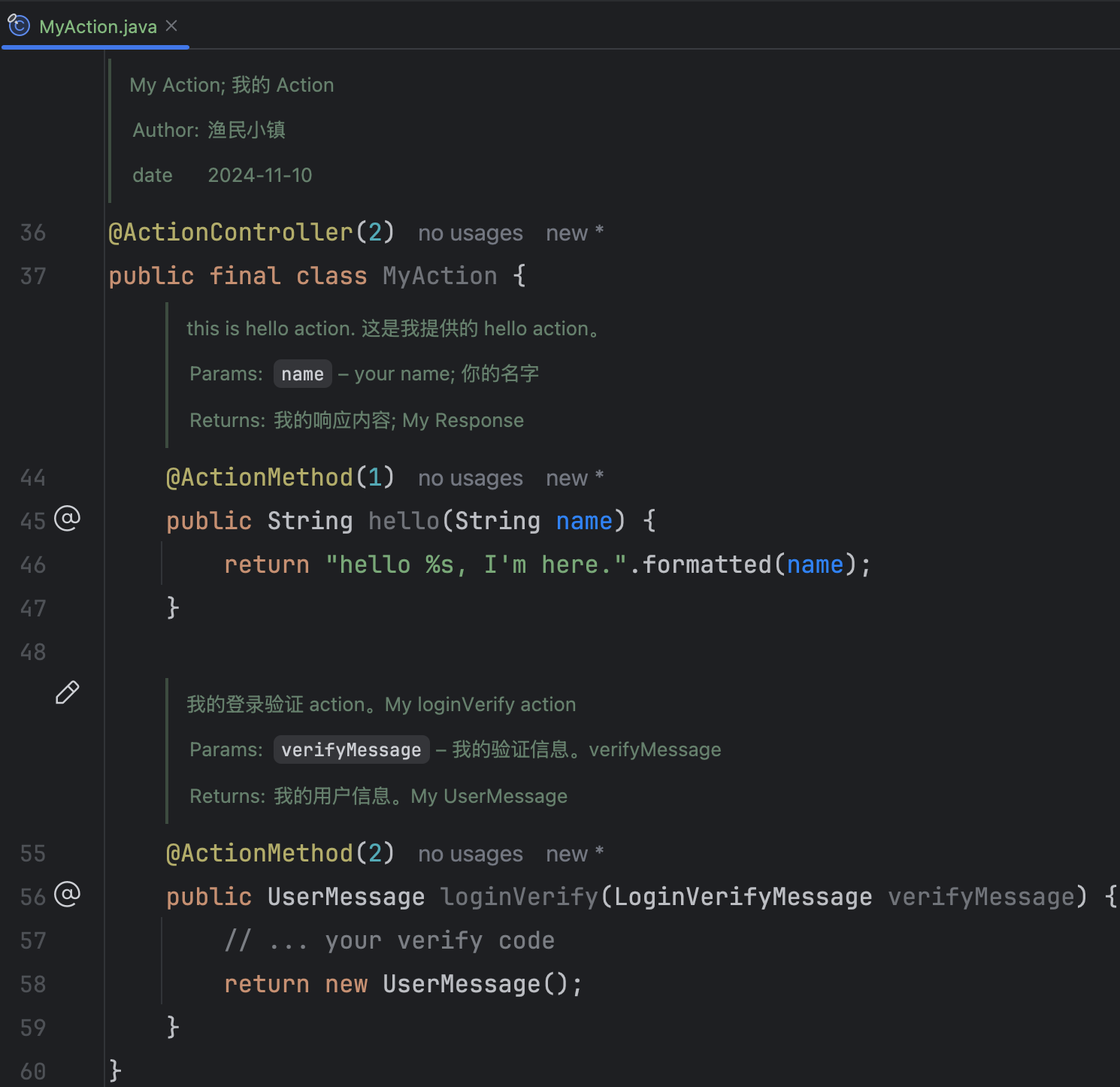
Let us first look at a Java code sample. In this sample, focus on class-level comments and action method-level comments. Next, we will use this code to demonstrate generated TypeScript, C#, and GDScript code.
For each action method, we provide:
- Method description
- Parameter description
- Return-value description
Generated TypeScript Code
Based on MyAction.java, generated TypeScript includes:
- Method description
- Parameter type and description
- Return-value type and description
- Usage examples for each method, so even beginners can use it quickly.
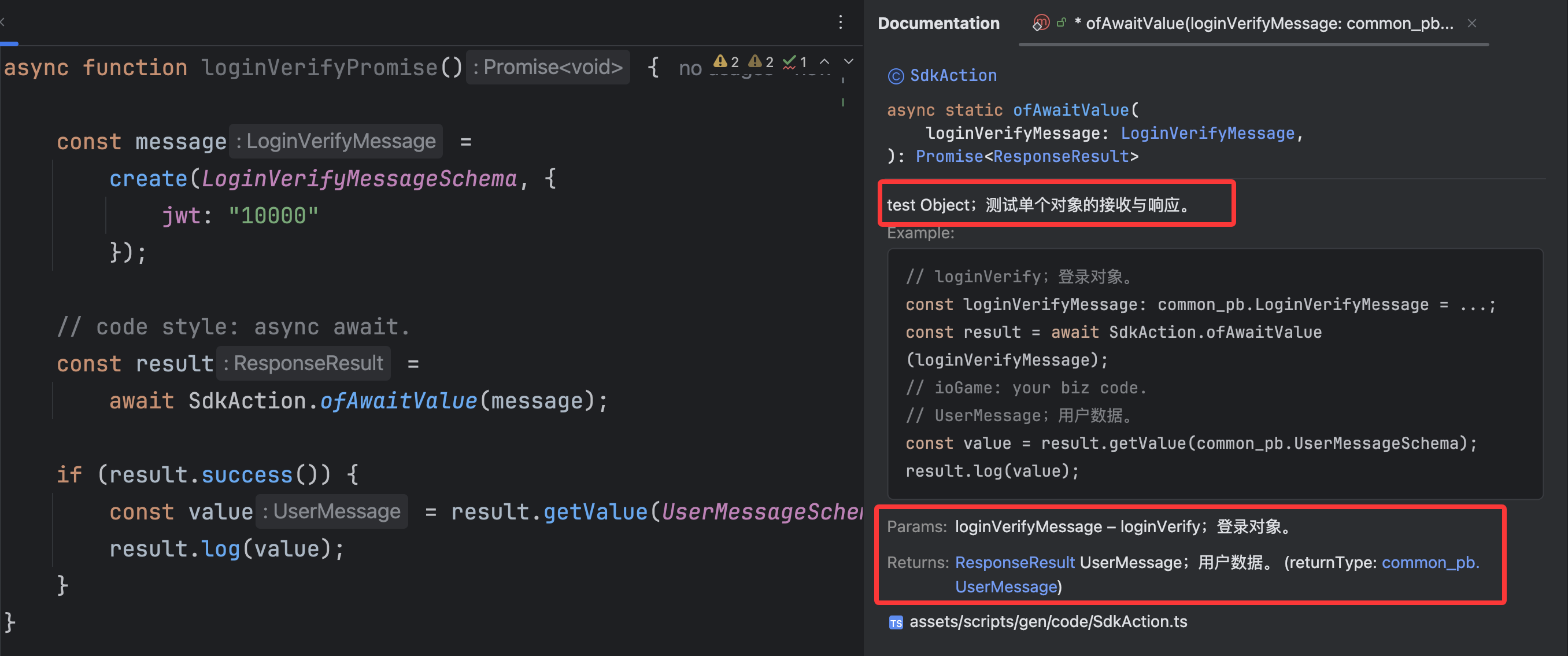
For each action, the framework generates two coding styles:
- code style: callback, method names start with
of. Advantage: concise and integrated. - code style: async await, method names start with
ofAwait. Advantage: avoids callback hell.
How to choose between the two styles?
The two coding styles are not fundamentally different. For simple business scenarios, choose callback style; for complex workflows, prefer async/await. Here, “complex” means you may need to keep requesting the server inside callbacks, which can cause callback hell. The async/await style helps avoid this problem.
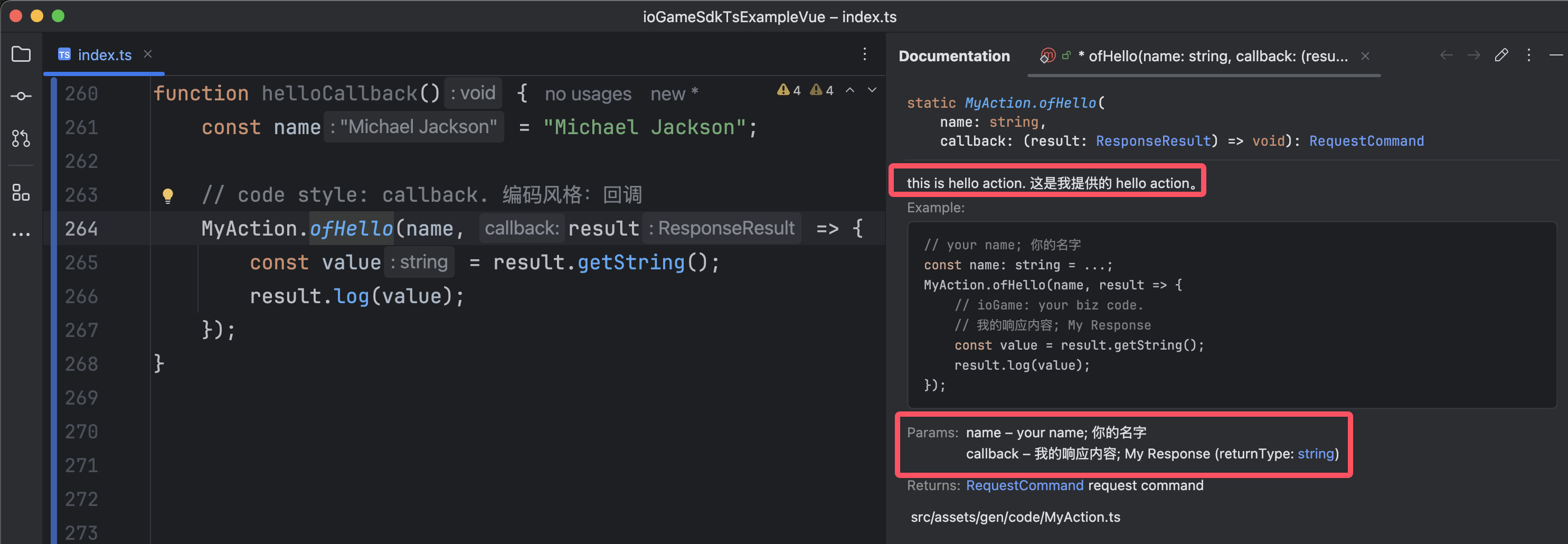
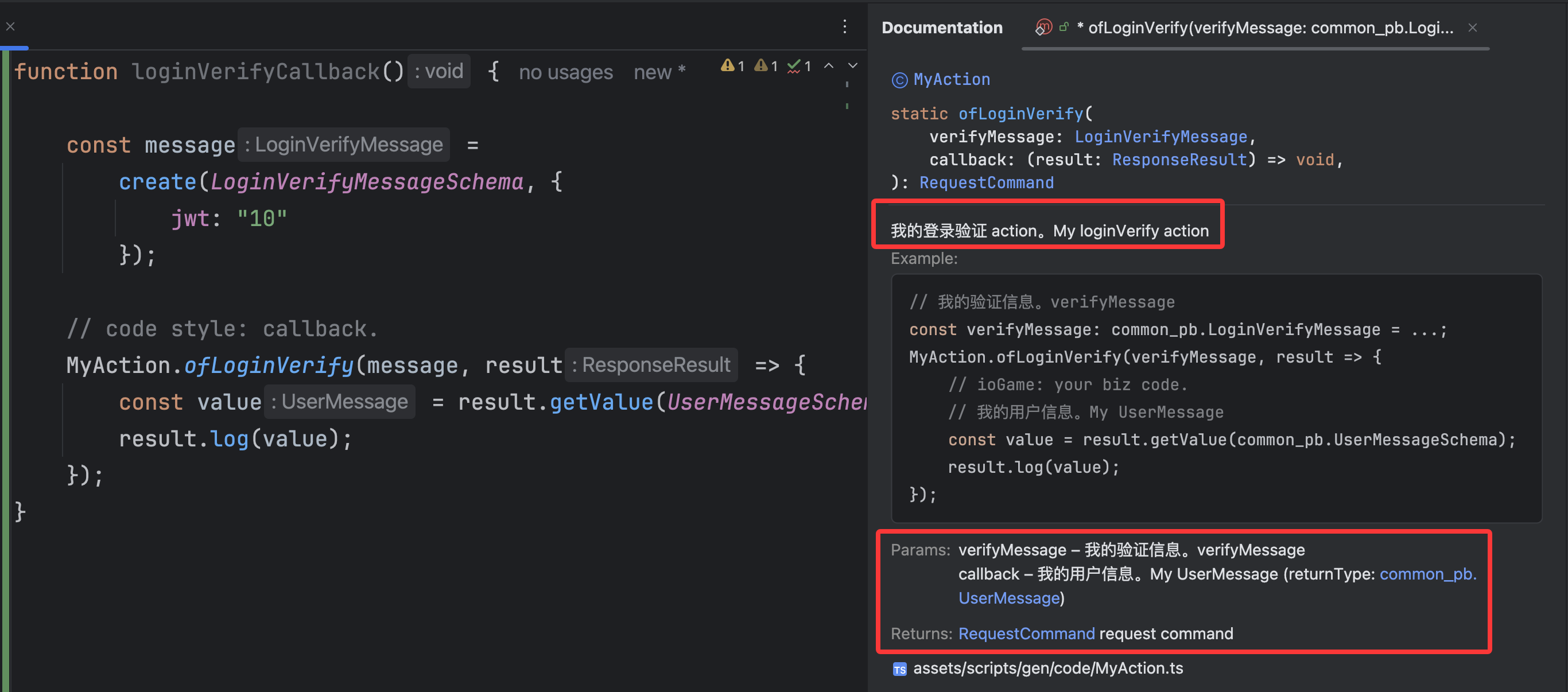
code style: callback
The figure below demonstrates callback style. Advantage: concise and integrated.
Check usage examples, method descriptions, and return information. These are aligned with Java-side descriptions.
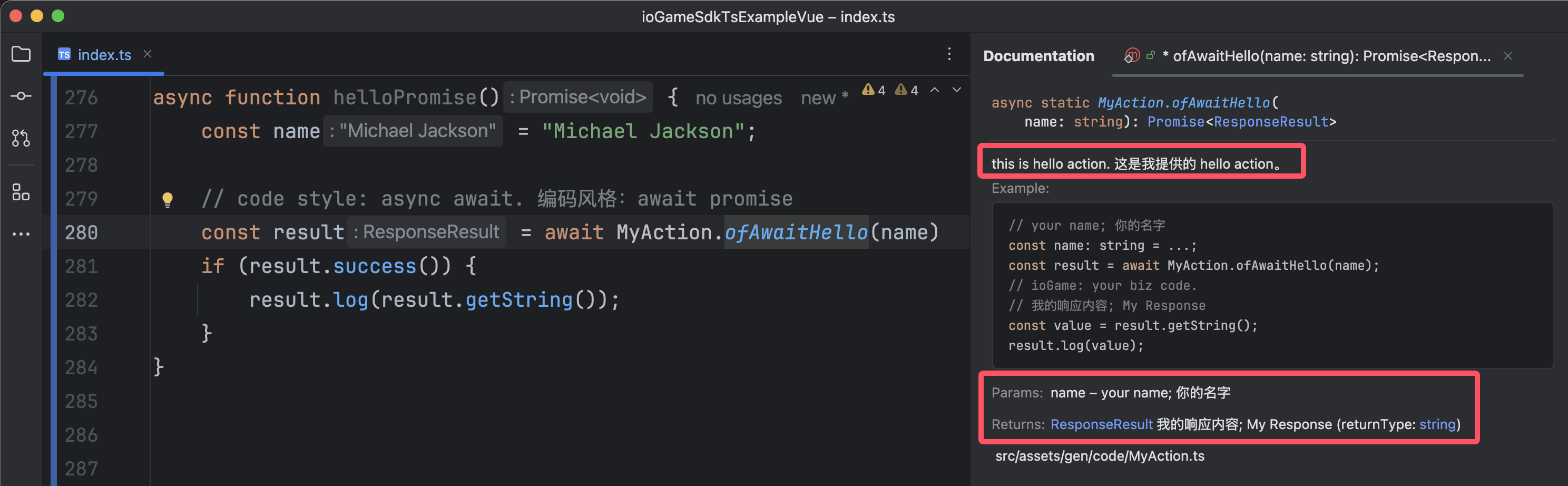
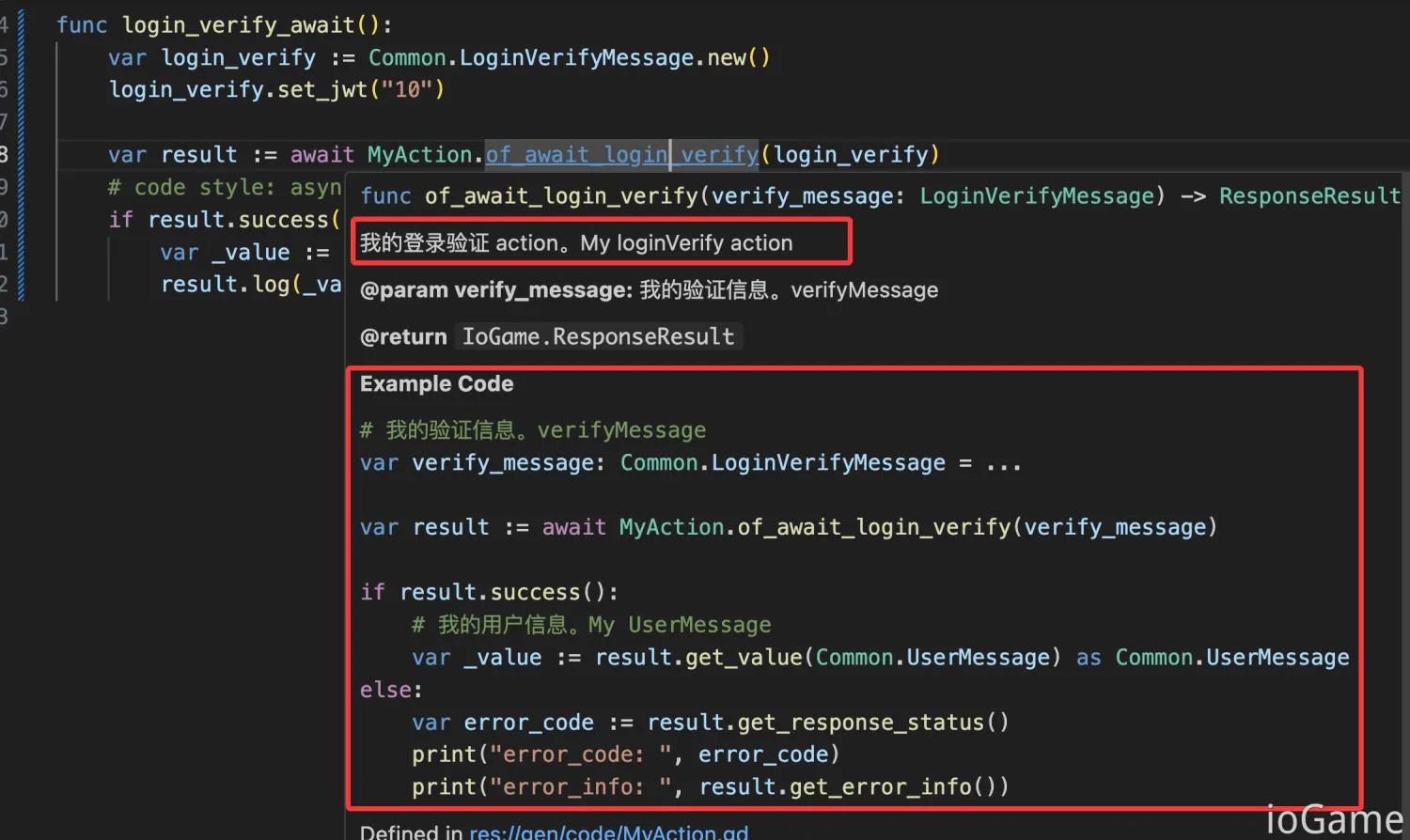
code style: async await
The figure below demonstrates async/await style. Advantage: avoids callback hell.
Note that framework generates usage examples according to each coding style.
Generated C# Code
Based on MyAction.java, generated C# includes:
- Method description
- Parameter type and description
- Return-value type and description
- Usage examples for each method, so even beginners can use it quickly.
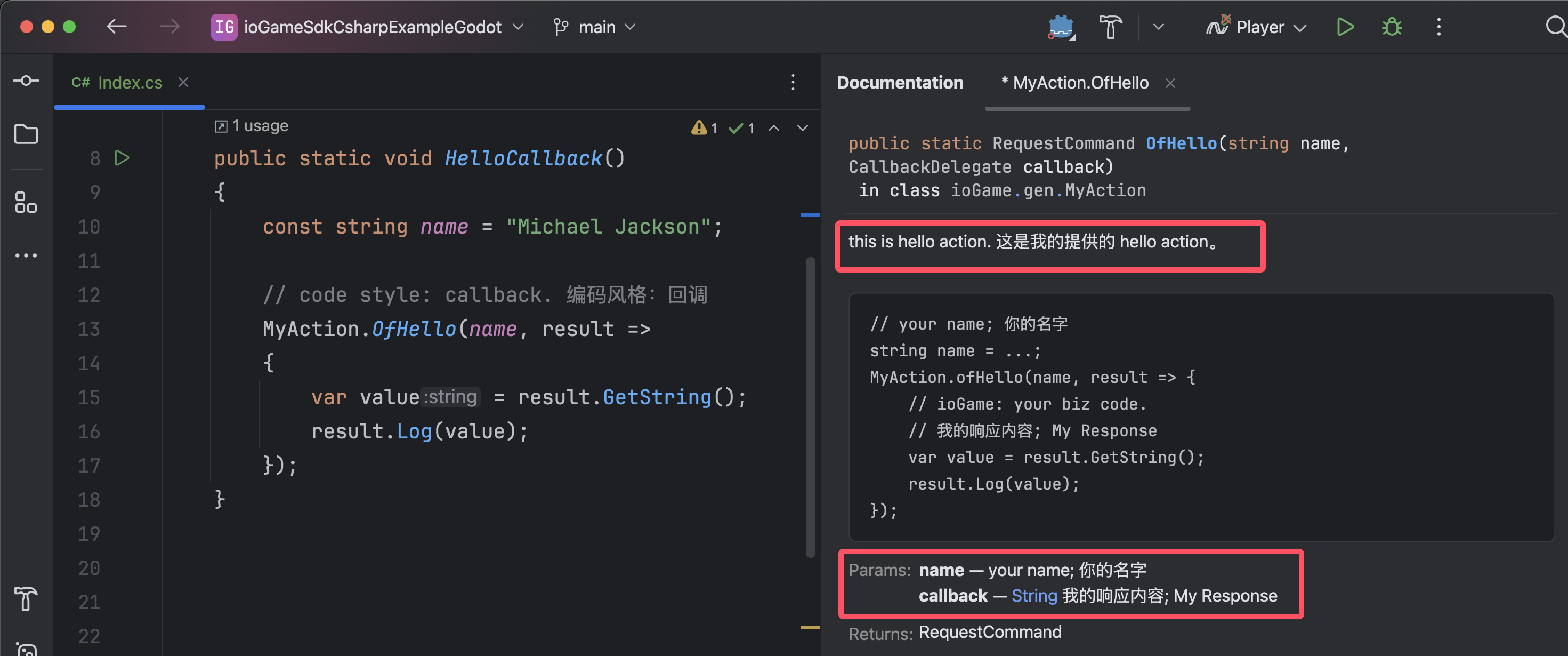
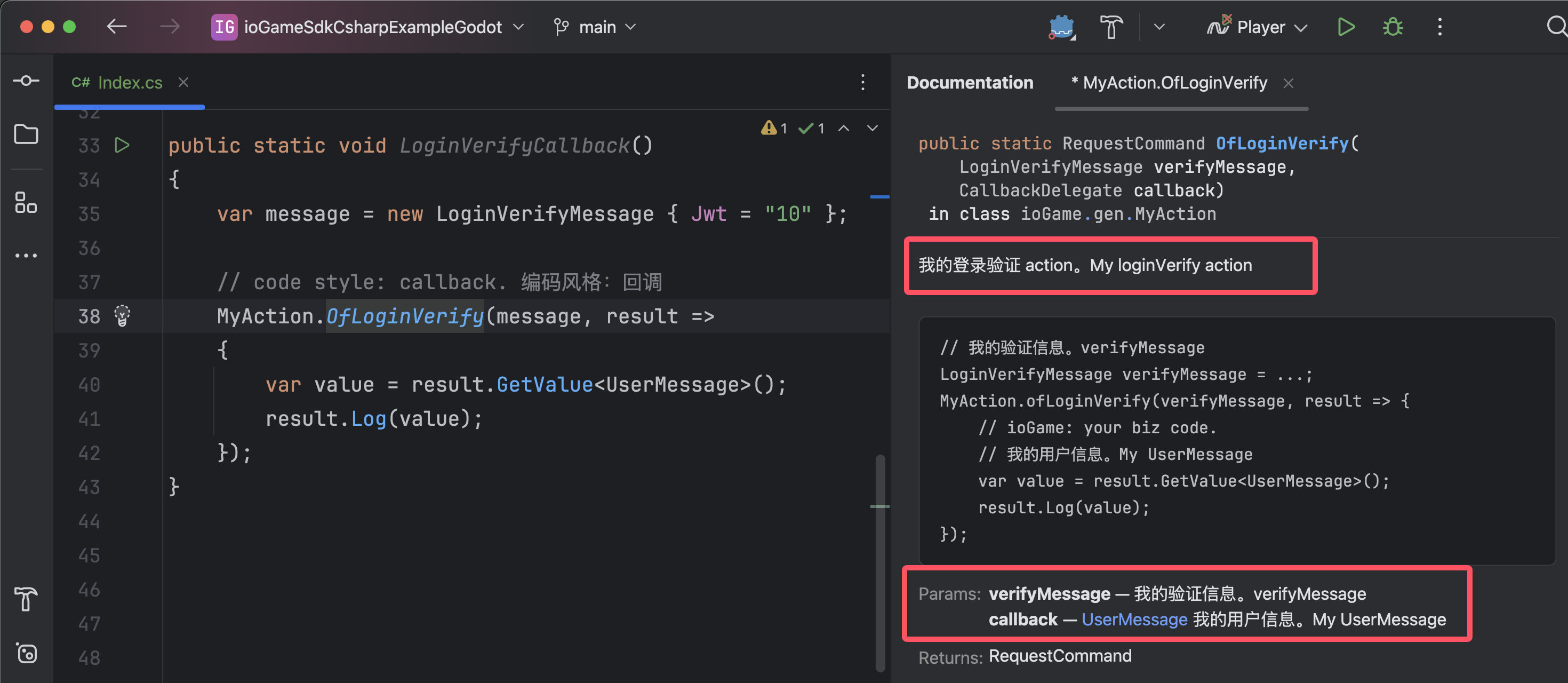
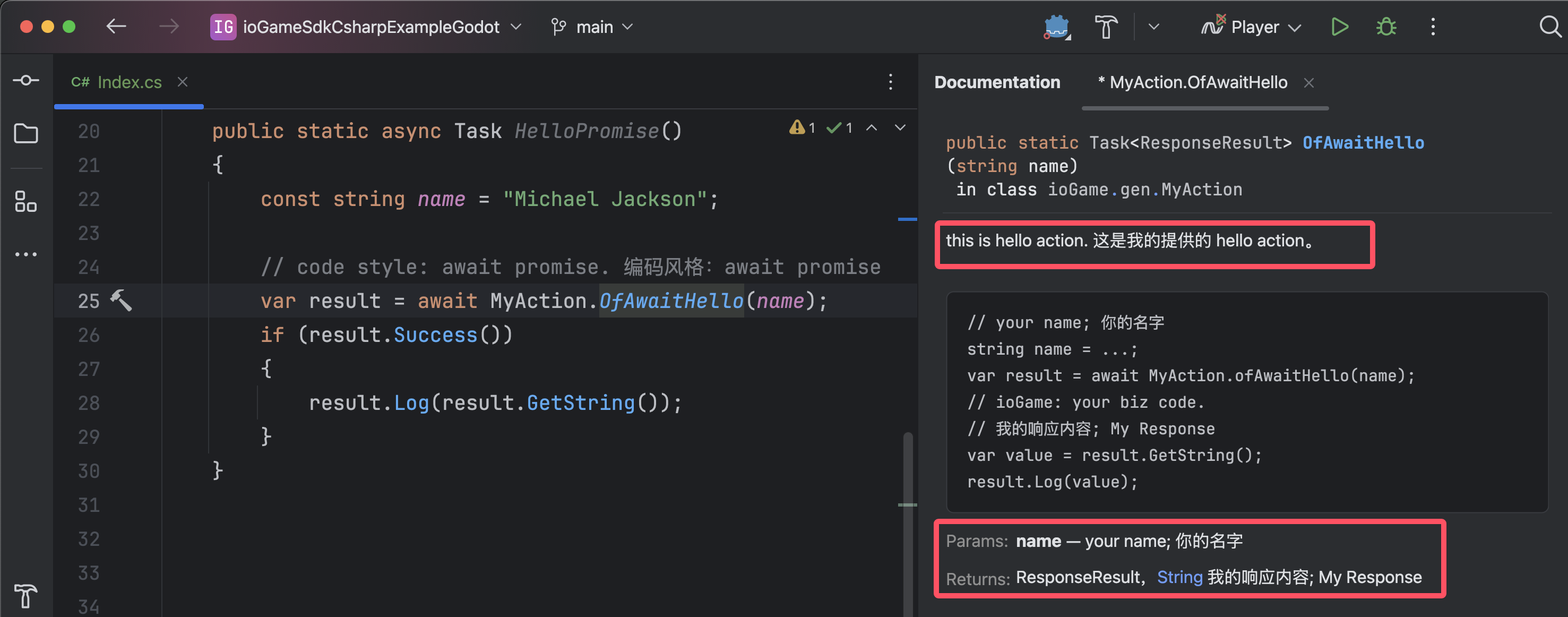
For each action, the framework generates two coding styles:
- code style: callback, method names start with
Of. Advantage: concise and integrated. - code style: async await, method names start with
OfAwait. Advantage: avoids callback hell.
How to choose between the two styles?
The two coding styles are not fundamentally different. For simple business scenarios, choose callback style; for complex workflows, prefer async/await. Here, “complex” means you may need to keep requesting the server inside callbacks, which can cause callback hell. The async/await style helps avoid this problem.
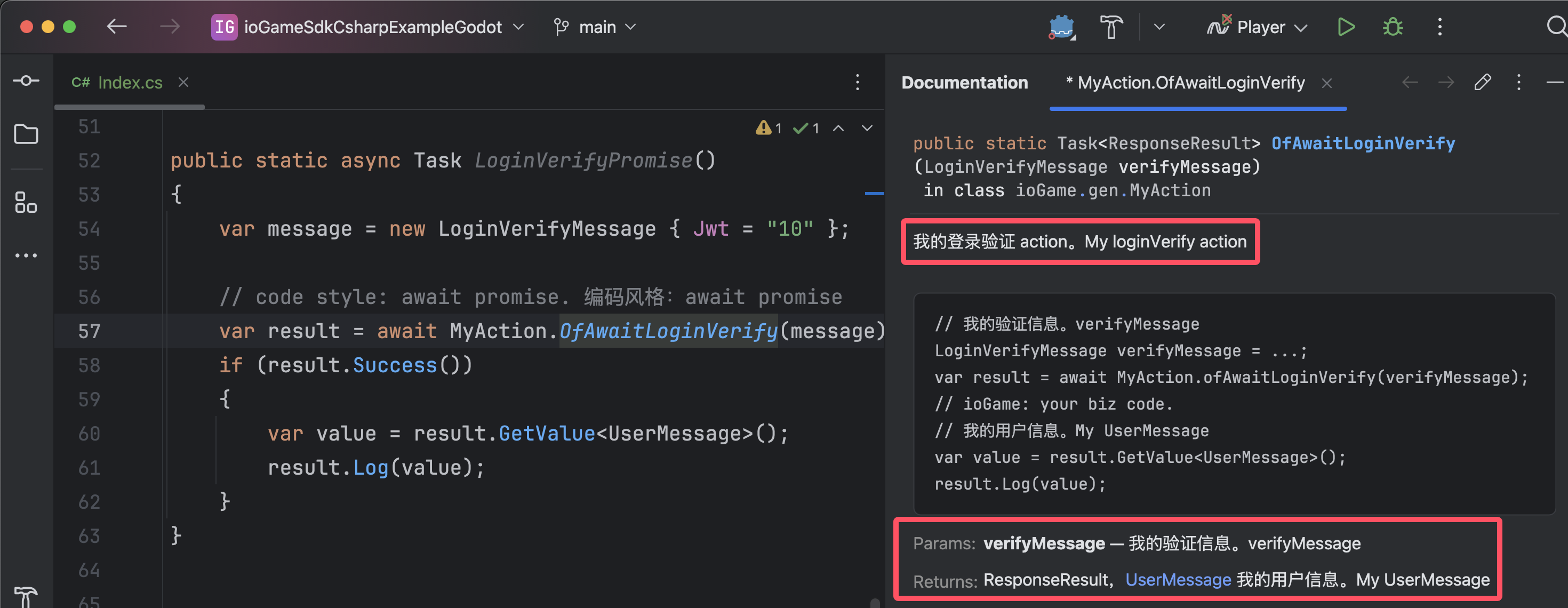
code style: callback
The figure below demonstrates callback style. Advantage: concise and integrated.
Check usage examples, method descriptions, and return information. These align with Java-side descriptions.
code style: async await
The figure below demonstrates async/await style. Advantage: avoids callback hell.
The framework generates usage examples according to each coding style.
Generated GDScript Code
Based on MyAction.java, generated GDScript includes:
- Method description
- Parameter type and description
- Return-value type and description
- Usage examples for each method, so even beginners can use it quickly.
For each action, the framework generates two coding styles:
- code style: callback, method names start with
of. Advantage: concise and integrated. - code style: async await, method names start with
of_await. Advantage: avoids callback hell.
How to choose between the two styles?
The two coding styles are not fundamentally different. For simple business scenarios, choose callback style; for complex workflows, prefer async/await. Here, “complex” means you may need to keep requesting the server inside callbacks, which can cause callback hell. The async/await style helps avoid this problem.
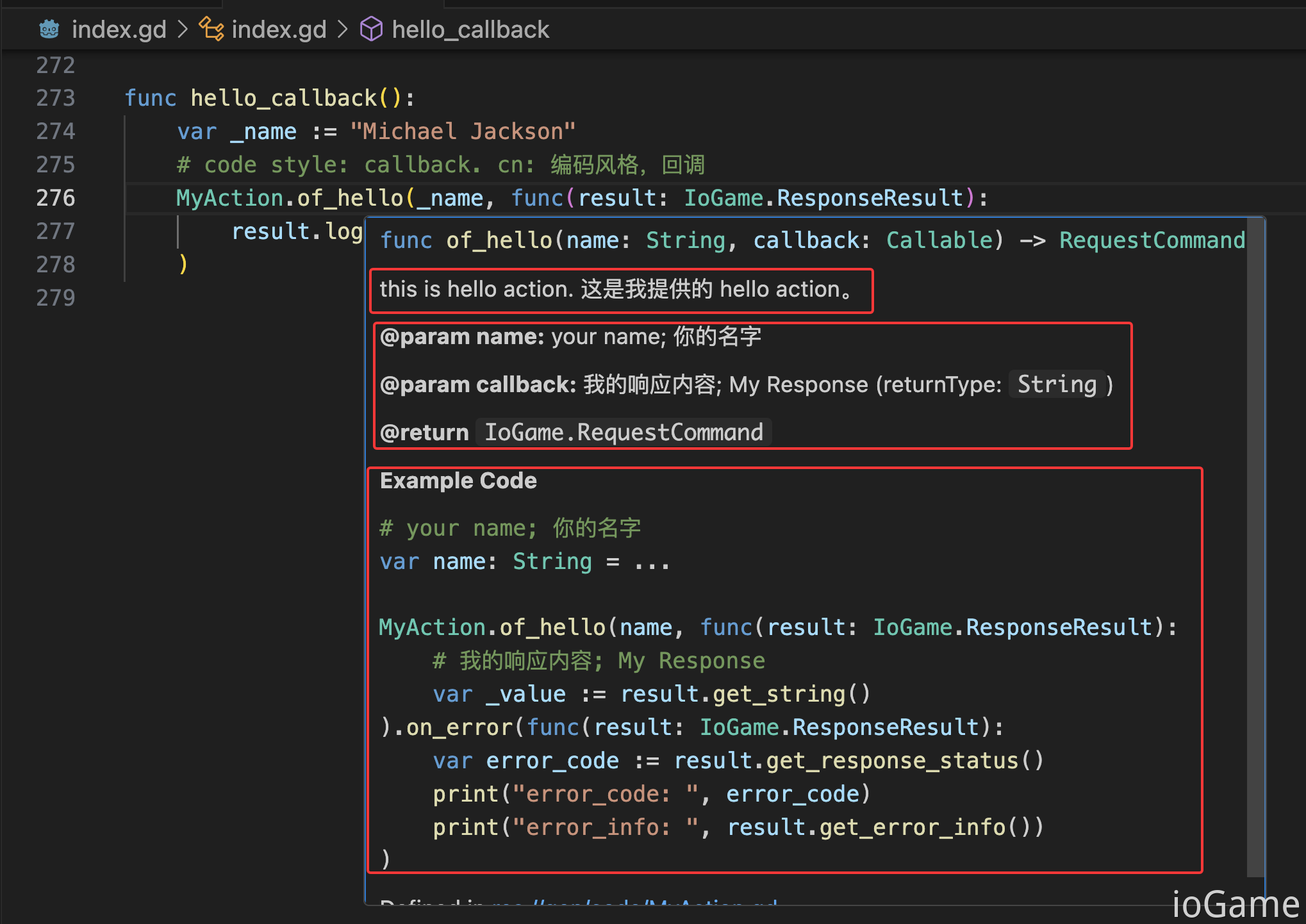
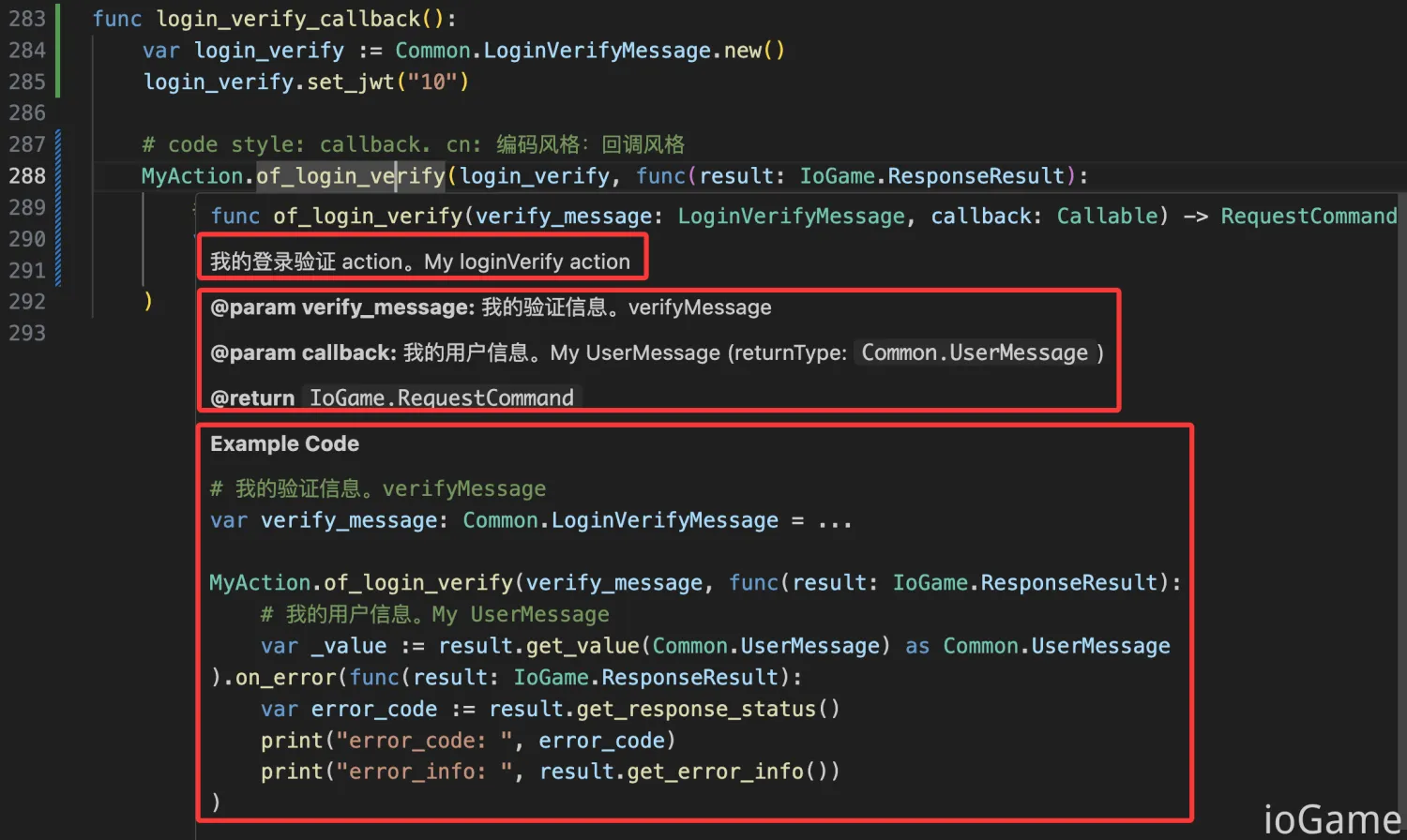
code style: callback
The figure below demonstrates callback style. Advantage: concise and integrated.
Check usage examples, method descriptions, and return information. These align with Java-side descriptions.
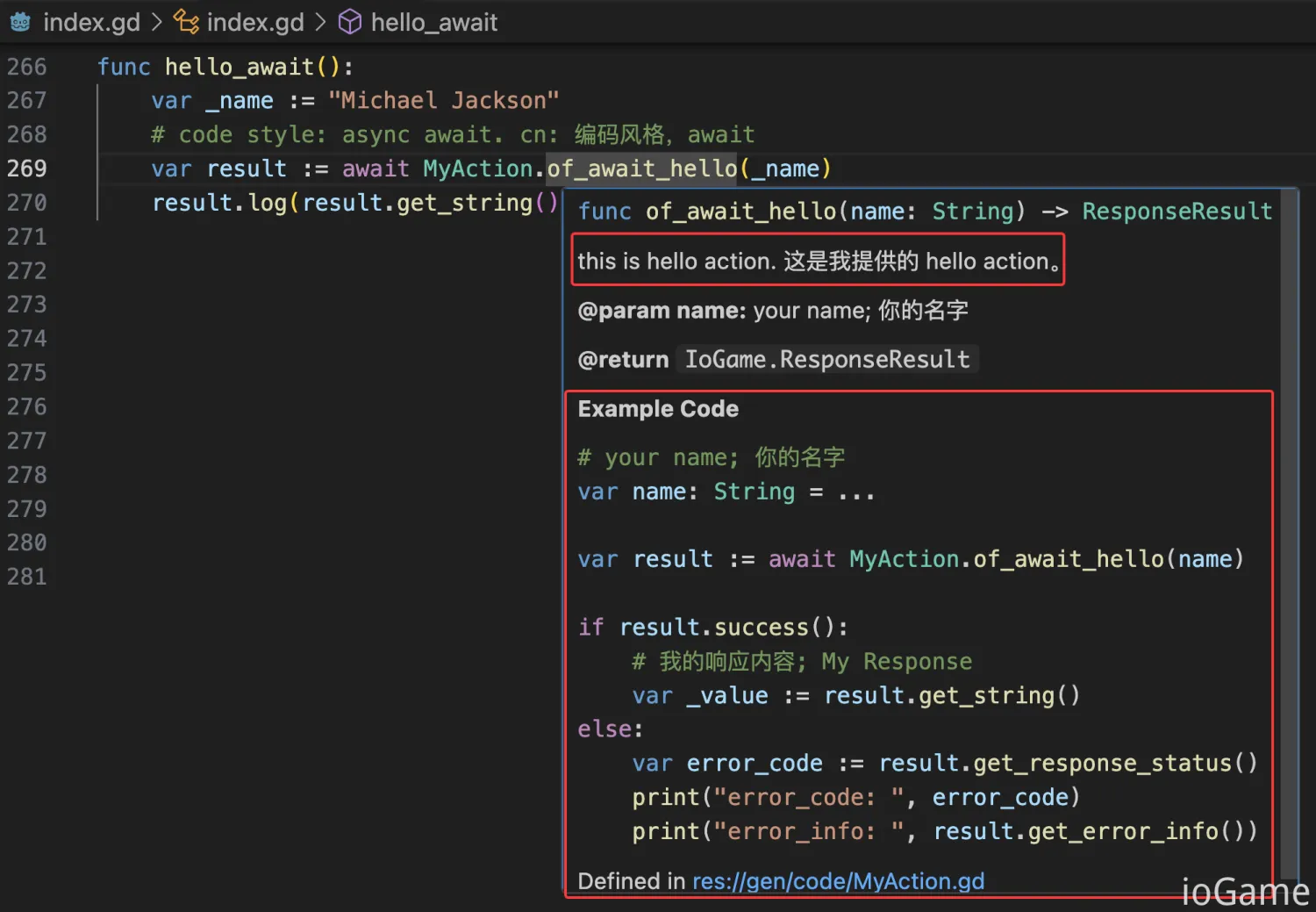
code style: async await
The figure below demonstrates async/await style. Advantage: avoids callback hell.
The framework generates usage examples according to each coding style.
Summary
Now you can see the power of write once, integrate everywhere. By writing one Java codebase, you can generate interaction code for multiple clients, which greatly reduces frontend workload. Generated interaction APIs are intuitive and feel like local calls.
Code generation allows developers to focus on business logic instead of writing and maintaining docs. It improves team collaboration efficiency and quality, and keeps docs synchronized and accurate. Without generated integration docs, teams must spend additional time writing and maintaining docs, and as teams grow, docs often become messy, out of sync, outdated, or forgotten.
With ionet, Java method comments become documentation, and action code becomes integration interfaces. After code is finished, corresponding docs and interaction code are generated together. This removes extra documentation maintenance work and saves significant time.
For each action, ionet generates two coding styles:
- code style: callback, method names start with
of. Advantage: concise and integrated. - code style: async await, method names start with
ofAwait. Advantage: avoids callback hell.
How to Generate Code
Install the code generation module. In the example source code, this is already installed.
The following is a high-level view of code generation. A rough read is enough for now.
The next subsection explains each generateCode_XXX in detail.
public final class GenerateTest {
    ...
    static void main() {
        // i18n: CHINA or US
        Locale.setDefault(Locale.US);
        CoreGlobalConfig.setting.parseDoc = true;

        /*
         * ExternalServer accessAuthentication
         * cn: 对外服访问权限,不生成权限控制的 action
         */
        SdkApplication.extractedAccess();
        DocumentAccessAuthentication reject = ExternalGlobalConfig.accessAuthenticationHook::reject;
        DocumentHelper.setDocumentAccessAuthentication(reject);

        // Load the business framework of each gameLogicServer
        // cn: 加载业务逻辑服
        SdkApplication.listLogic().forEach(logicServer -> {
            var builder = BarSkeleton.builder();
            logicServer.settingBarSkeletonBuilder(builder);
            builder.build();
        });

        /*
         * Generate actions, broadcasts, and error codes.
         * cn: 生成 action、广播、错误码
         */

        // ----- About generating TypeScript code -----
        // generateCodeVue();
        // generateCocosCreator();

        // ----- About generating C# code -----
        // generateCodeCsharpGodot();
        // generateCodeCsharpUnity();

        // ----- About generating GDScript code -----
        generateCodeGDScriptGodot();

        // Added an enumeration error code class to generate error code related information
        DocumentHelper.addErrorCodeClass(ErrorCode.class);
        // Generate document
        DocumentHelper.generateDocument();
        // Generate .proto
        generateProtoFile();
    }

    static void generateProtoFile() {
        // By default, it will be generated in the target/proto directory
        // .proto 默认生成的目录为 target/proto

        // The package name to be scanned
        String packagePath = "com.iohao.example.sdk.data";
        GenerateFileKit.generate(packagePath);
    }
}
Steps for generating SDK interaction code:
- Load logic services to generate code for (used for
xxxActionand broadcasts) - Add target interaction language generators via generateCode_XXX
- Add error code classes via addErrorCodeClass (for error-code generation)
- Generate
.protovia generateProtoFile
Now we only need to focus on methods starting with generateCodeXXX. Although the sample includes multiple generators, in real projects you usually need only one target language. By default, generated interaction code is output to the current project's target/code directory.
Currently, we provide generation implementations for TypeScript, C#, and GDScript.
| Class | Description |
|---|---|
| GDScriptDocumentGenerate | Generates GDScript code |
| CSharpDocumentGenerate | Generates C# code |
| TypeScriptDocumentGenerate | Generates TypeScript code |
Generate TypeScript
generateCodeVue() and generateCocosCreator() both use TypeScriptDocumentGenerate.
The following sample demonstrates TypeScript generation for Vue and CocosCreator projects.
public final class GenerateTest {
    String rootPath = "/Users/join/gitme/example-sdk/";
    ...

    public static void main(String[] args) {
        ...

        /*
         * Generate actions, broadcasts, and error codes.
         * cn: 生成 action、广播、错误码
         */

        // About generating TypeScript code
        generateCodeVue();
        generateCocosCreator();

    }

    private static void generateCodeVue() {
        var documentGenerate = new TypeScriptDocumentGenerate();

        // 设置代码生成所存放的路径,如果不做任何设置,将会生成在 target/code 目录中
        // By default, it will be generated in the target/code directory
        String path = rootPath + "SdkTsExampleVue/src/assets/gen/code";
        documentGenerate.setPath(path);

        DocumentHelper.addDocumentGenerate(documentGenerate);
    }

    private static void generateCocosCreator() {
        var documentGenerate = new TypeScriptDocumentGenerate();

        // 设置代码生成所存放的路径,如果不做任何设置,将会生成在 target/code 目录中
        // By default, it will be generated in the target/code directory
        String path = rootPath + "SdkTsExampleCocos/assets/scripts/gen/code";
        documentGenerate.setPath(path);

        DocumentHelper.addDocumentGenerate(documentGenerate);
    }
}
Generate C#
generateCodeCsharpUnity() and generateCodeCsharpGodot() both use CsharpDocumentGenerate.
The following sample demonstrates C# generation for Unity and Godot projects.
public final class GenerateTest {
    String rootPath = "/Users/join/gitme/example-sdk/";
    ...

    public static void main(String[] args) {
        ...

        /*
         * Generate actions, broadcasts, and error codes.
         * cn: 生成 action、广播、错误码
         */

        // ----- About generating C# code -----
        generateCodeCsharpUnity();
        generateCodeCsharpGodot();
    }

    private static void generateCodeCsharpUnity() {
        var documentGenerate = new CsharpDocumentGenerate();
        // 设置代码生成所存放的路径,如果不做任何设置,将会生成在 target/code 目录中
        // By default, it will be generated in the target/code directory
        String path = rootPath + "SdkCsharpExampleUnity/Assets/Scripts/Gen/Code";
        documentGenerate.setPath(path);

        DocumentHelper.addDocumentGenerate(documentGenerate);
    }

    private static void generateCodeCsharpGodot() {
        var documentGenerate = new CsharpDocumentGenerate();
        // 设置代码生成所存放的路径,如果不做任何设置,将会生成在 target/code 目录中
        // By default, it will be generated in the target/code directory
        String path = rootPath + "SdkCsharpExampleGodot/script/gen/code";
        documentGenerate.setPath(path);

        DocumentHelper.addDocumentGenerate(documentGenerate);
    }
}
Generate GDScript
generateCodeGDScriptGodot() uses GDScriptDocumentGenerate.
The following sample demonstrates GDScript generation for a Godot project.
public final class GenerateTest {
    String rootPath = "/Users/join/gitme/example-sdk/";
    ...

    public static void main(String[] args) {
        ...

        /*
         * Generate actions, broadcasts, and error codes.
         * cn: 生成 action、广播、错误码
         */

        // ----- About generating GDScript code -----
        generateCodeGDScriptGodot();
    }

    private static void generateCodeGDScriptGodot() {
        var documentGenerate = new GDScriptDocumentGenerate();
        // cn: 设置代码生成所存放的路径,如果不做任何设置,将会生成在 target/code 目录中
        // By default, it will be generated in the target/code directory
        String path = rootPath + "SdkGDScriptExampleGodot/gen/code";
        documentGenerate.setPath(path);

        DocumentHelper.addDocumentGenerate(documentGenerate);
    }
}
Generate Broadcast Code
Broadcast generation differs from action generation and requires explicit configuration. This is because action source metadata can be parsed directly, while broadcasts need additional metadata. So broadcast configuration is required to generate interactive code.
In code, we configure two public broadcast methods, including:
- Set broadcast route
setMethodDescriptionset method descriptionsetMethodNameset method namesetDataClassset broadcast return type/description for single-value returnsetDataClassListset broadcast return type/description for list return
It is usually recommended to configure broadcast definitions in their related logic services. For example, mail-related broadcasts should be configured in mail logic service.
public final class SdkLogicServer implements LogicServer {
    @Override
    public void settingBarSkeletonBuilder(BarSkeletonBuilder builder) {
        extractedDoc(builder);
        ...
    }

    private void extractedDoc(BarSkeletonBuilder builder) {
        // single value
        builder.addBroadcastDocument(BroadcastDocument.builder(SdkCmd.of(SdkCmd.broadcastInt))
                .setDataClass(int.class, "biz data description")
                .setMethodDescription("IntValue method description")
                .setMethodName("IntValue")
        );

        // list value
        builder.addBroadcastDocument(BroadcastDocument.builder(SdkCmd.of(SdkCmd.broadcastListInt))
                .setDataClassList(int.class, "biz id list")
                .setMethodDescription("IntValueList method description")
                .setMethodName("IntValueList")
        );
    }
}
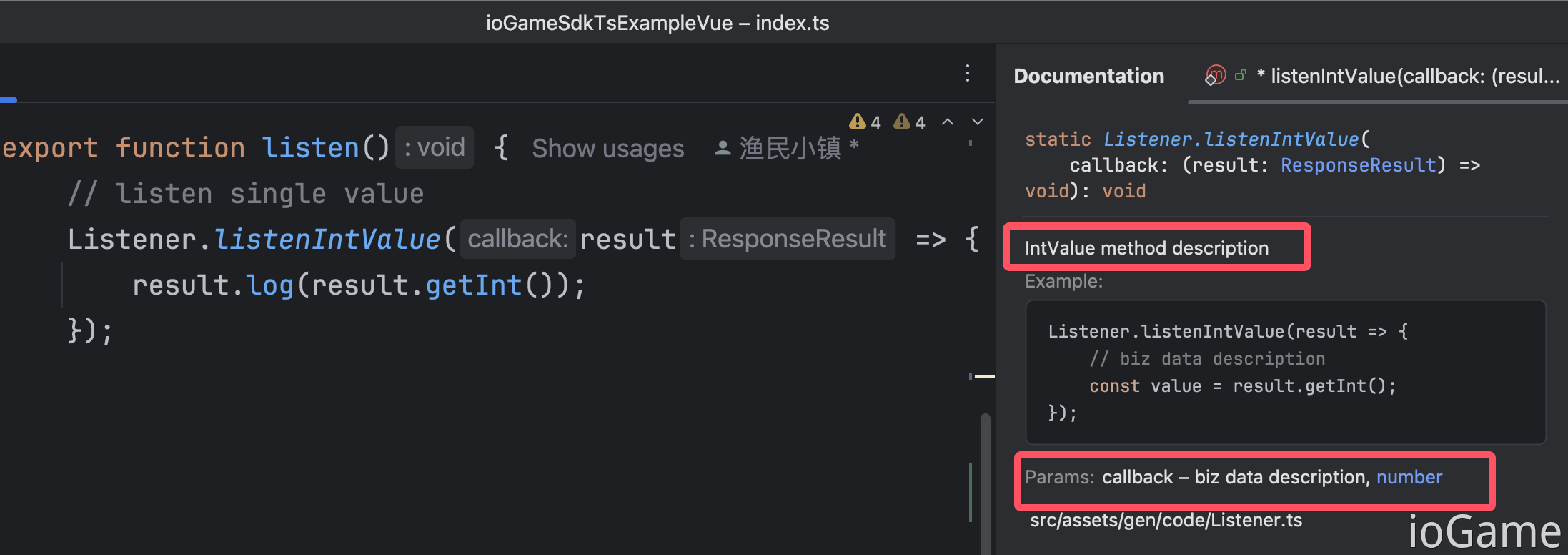
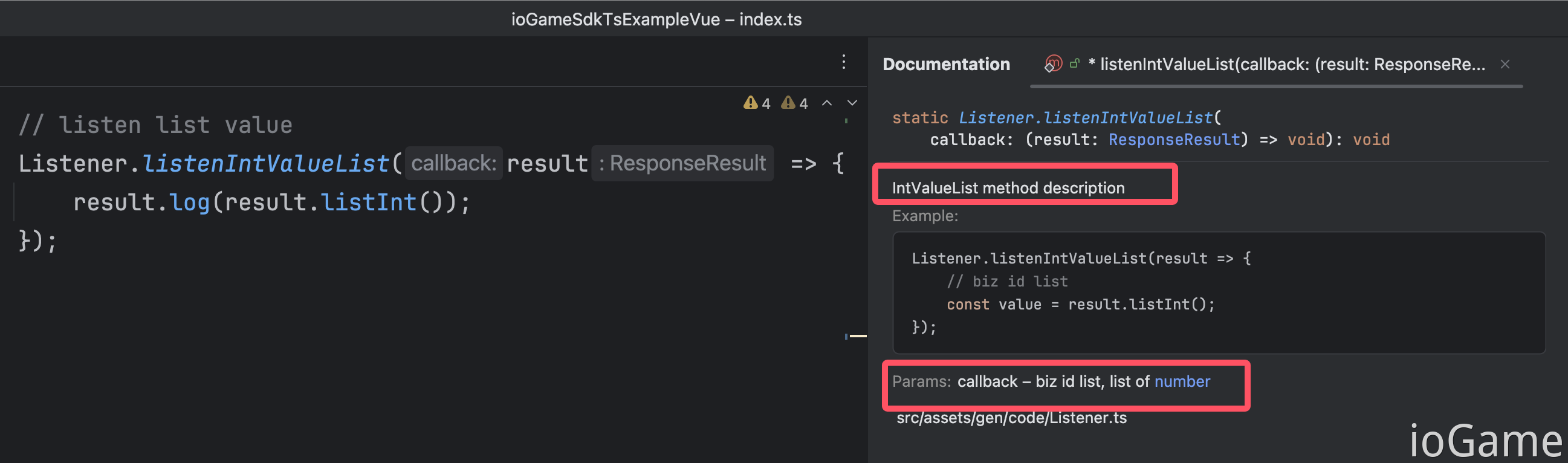
Generated code looks like the screenshots below.
The following screenshots show TypeScript broadcast code. Other languages are similar.
Route Access Control
In development, some actions should only be accessible internally, such as adding coins or changing sensitive values. These actions should not be directly accessible externally, where external means connected players.
Since such actions are internal only, they should not appear in integration docs. Without control, they can also distract developers reading integration docs.
ExternalGlobalConfig.accessAuthenticationHook, Related docs - Route Access Control
public class SdkApplication {
    static void extractedAccess() {
        ...

        /*
         * Notice:
         *     Reject cmd: Routes that deny access to any player.
         *     These action methods will not be generated by the SDK.
         *
         *     cn: sdk 将不会生成这些配置了 Rejection 的 action 方法。
         */
        accessAuthenticationHook.addRejectionCmd(SdkCmd.cmd, SdkCmd.internalAddMoney);
    }
}

public class GenerateTest {
    ...
    public static void main(String[] args) {
        SdkApplication.extractedAccess();
        // Set route access control.
        // cn: 设置路由访问权限控制
        DocumentHelper.setDocumentAccessAuthentication(ExternalGlobalConfig.accessAuthenticationHook::reject);

        ...

        DocumentHelper.generateDocument();
    }
}
Notes and Considerations
By default, generated action method names use Java action method names. If Java action method names change, client-side code will be affected.
There are two ways to avoid this:
- Do not rename already published action methods.
- Use the DocumentMethod annotation to define generated method names. The framework prioritizes annotation value during generation.
@ActionController(MyCmd.cmd)
public final class MyAction {
    @ActionMethod(MyCmd.noReturn)
    @DocumentMethod("noReturnMethod")
    public void noReturn(String name) {
        ...
    }
}
In most cases, if you do not frequently rename action methods, you can skip DocumentMethod for cleaner code.
But always remember: do not rename already published method names, otherwise frontend developers may face unnecessary integration friction.
Error Codes and Error Handling
Error-code related generated files are uniformly named GameCode.
When an error occurs, server puts error code into result responseStatus.
Below are two coding-style examples for error handling, demonstrated in C#.
Other languages are similar.
public static async Task OnTestError()
{
    var value = _testErrorValue++;
    Log("------- OnTestError ------");

    // code style: callback.
    SdkAction.OfTestError(value, result =>
    {
        result.Log(result.GetInt());
    }).OnError(result =>
    {
        // error
        result.Log(result.GetErrorInfo());
        // result.GetResponseStatus()
    });

    // code style: async await.
    var result = await SdkAction.OfAwaitTestError(value);
    // result.GetResponseStatus()
    if (result.Success())
        result.Log(result.GetInt());
    else
        result.Log(result.GetErrorInfo());
}
Broadcast Code Usage
Generated broadcast-related files for TypeScript, C#, and GDScript are uniformly named Listener, such as Listener.cs and Listener.ts.
The Listener file contains all server-initiated broadcast actions.
Typically, you only need to write your business logic inside broadcast listener callbacks:
C#
Listener.ListenBulletBroadcast(result =>
{
    var bulletMessage = result.GetValue<BulletMessage>();
    result.Log(bulletMessage);
});

// This method adds print behavior for all broadcast listeners, aiming to inform developers which broadcast methods haven't been handled.
// cn: 该方法为所有广播监听添加了打印的行为,目的是让开发者知道有哪些广播方法没有处理
Listener.Listener_ioGame();
Typescript
Listener.listenBulletBroadcast(result => {
    const bullet = result.getValue(BulletMessageSchema);
    result.log(bullet);
})

// This method adds print behavior for all broadcast listeners, aiming to inform developers which broadcast methods haven't been handled.
// cn: 该方法为所有广播监听添加了打印的行为,目的是让开发者知道有哪些广播方法没有处理
Listener.listener_all();
GDScript
# GDScript
func listene():
	Listener.listen_bullet_broadcast(func(result: IoGame.ResponseResult):
		var bullet := result.get_value(Common.BulletMessage) as Common.BulletMessage
        result.log(bullet)
	)

// This method adds print behavior for all broadcast listeners, aiming to inform developers which broadcast methods haven't been handled.
// cn: 该方法为所有广播监听添加了打印的行为,目的是让开发者知道有哪些广播方法没有处理
Listener.listener_all()
Summary
The framework achieves write once, integrate everywhere, bringing major productivity gains.
Code generation enables developers to focus on business logic instead of documentation writing. It significantly improves team collaboration efficiency and quality, and ensures documentation synchronization and accuracy.
Although this document spends substantial space introducing integration docs,
actual usage is simple: only a few lines of code can generate actions, broadcasts, error codes, and .proto related files.
public final class GenerateTest {
    ...

    static void main() {
        // i18n: CHINA or US
        Locale.setDefault(Locale.US);
        CoreGlobalConfig.setting.parseDoc = true;

        /*
         * ExternalServer accessAuthentication
         * cn: 对外服访问权限,不生成权限控制的 action
         */
        SdkApplication.extractedAccess();
        DocumentAccessAuthentication reject = ExternalGlobalConfig.accessAuthenticationHook::reject;
        DocumentHelper.setDocumentAccessAuthentication(reject);

        // Load the business framework of each gameLogicServer
        // cn: 加载游戏逻辑服的业务框架
        SdkApplication.listLogic().forEach(logicServer -> {
            var builder = BarSkeleton.builder();
            logicServer.settingBarSkeletonBuilder(builder);
            builder.build();
        });

        /*
         * Generate actions, broadcasts, and error codes.
         * cn: 生成 action、广播、错误码
         */

        // ----- About generating C# code -----
        generateCodeCsharpGodot();

        // Added an enumeration error code class to generate error code related information
        // cn: 错误码的生成
        DocumentHelper.addErrorCodeClass(ErrorCode.class);
        // Generate document;
        DocumentHelper.generateDocument();
        // Generate .proto
        // cn: 生成 .proto 文件
        generateProtoFile();
    }

    private static void generateCodeCsharpGodot() {
        var documentGenerate = new CsharpDocumentGenerate();
        // 设置代码生成所存放的路径,如果不做任何设置,将会生成在 target/code 目录中
        // By default, it will be generated in the target/code directory
        String path = rootPath + "SdkCsharpExampleGodot/script/gen/code";
        documentGenerate.setPath(path);

        DocumentHelper.addDocumentGenerate(documentGenerate);
    }

    static void generateProtoFile() {
        // By default, it will be generated in the target/proto directory
        // 如果不设置,.proto 默认生成的目录为 target/proto
        String path = "/your/proto/path";

        // The package name to be scanned
        String packagePath = "com.iohao.example.sdk.data";

        var protoGenerateFile = new ProtoGenerateFile()
            .setGenerateFolder(path)
            .addProtoPackage(packagePath);

        protoGenerateFile.generate();
    }
}

public final class SdkApplication {
    static List<LogicServer> listLogic() {
        return List.of(
                new SdkLogicServer()
        );
    }
}
Logic Service Modularization
Usually, we modularize logic services to build our own ecosystem. Modularization also allows other projects to reuse existing capabilities and avoid repeated development.
At generation time, whichever logic services you configure, the framework generates corresponding content (actions and broadcasts). As mentioned in the broadcast configuration section, it is recommended to place broadcast config in its related logic service, for example, mail-related broadcasts in mail logic service.
This is also modular thinking in practice. If you do not need a mail logic service, do not load that module during generation, and then mail-related generated content will not be produced.
public final class SdkApplication {
    static List<LogicServer> listLogic() {
        return List.of(
                new SdkLogicServer()
                // new MailLogicServer()
                // new ChatLogicServer()
        );
    }
}
How to Extend More Languages
Currently, we support TypeScript, C#, and GDScript.
If needed, developers can extend generation by implementing the DocumentGenerate interface.
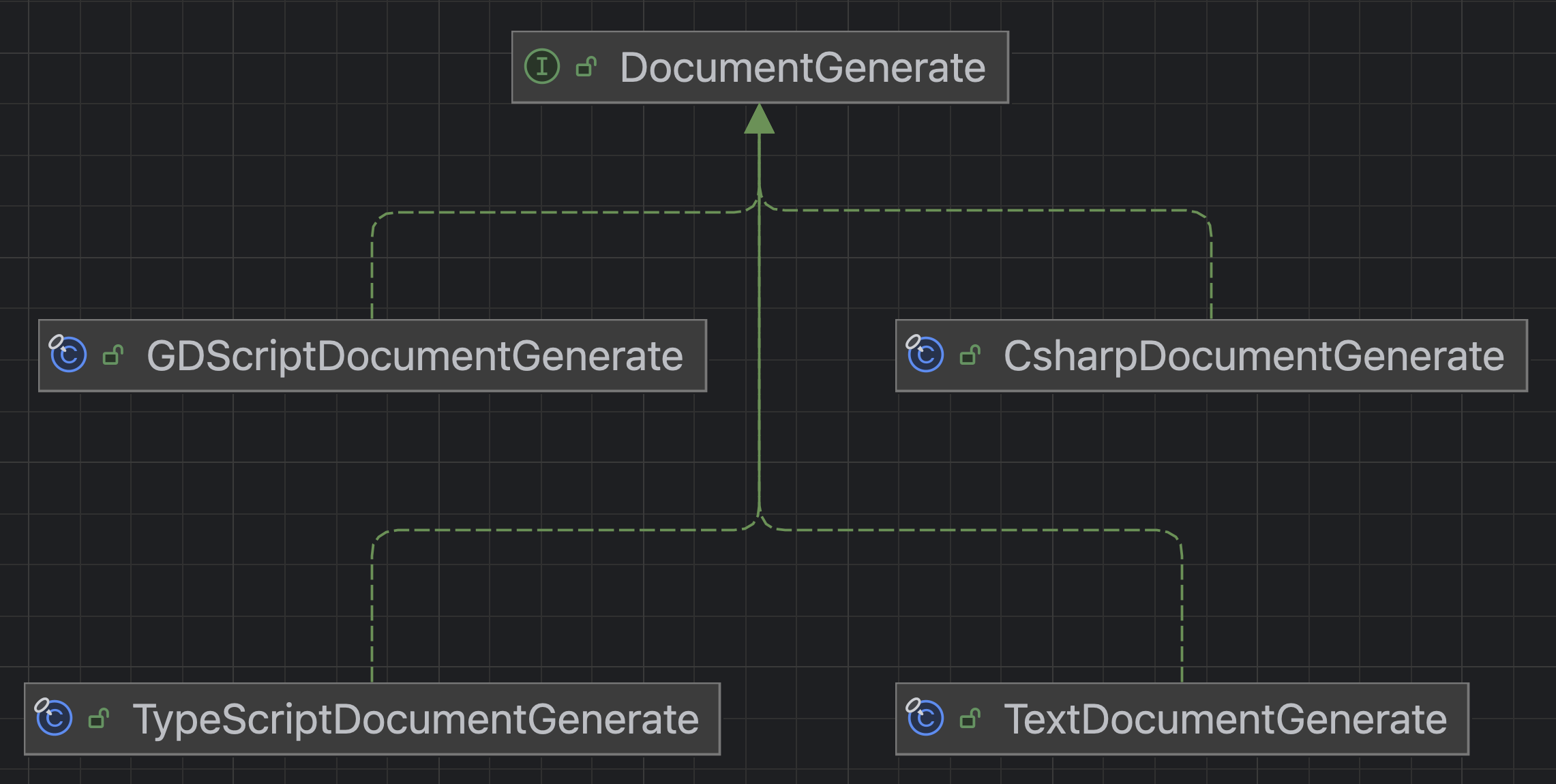
By implementing DocumentGenerate, developers can add customized document/code generators, such as:
- HTML-format documentation
- JSON-format documentation
- Integration docs for additional languages
void test() {
    var documentGenerate = new YourDocumentGenerate();
    DocumentHelper.addDocumentGenerate(documentGenerate);
}